A delayed customer response, an invoice waiting for verification, or a shipment update sitting in someone's inbox may look like separate problems. Often, they're symptoms of the same issue: your team has to interpret information, find the right record, and decide what happens next before work can move forward.
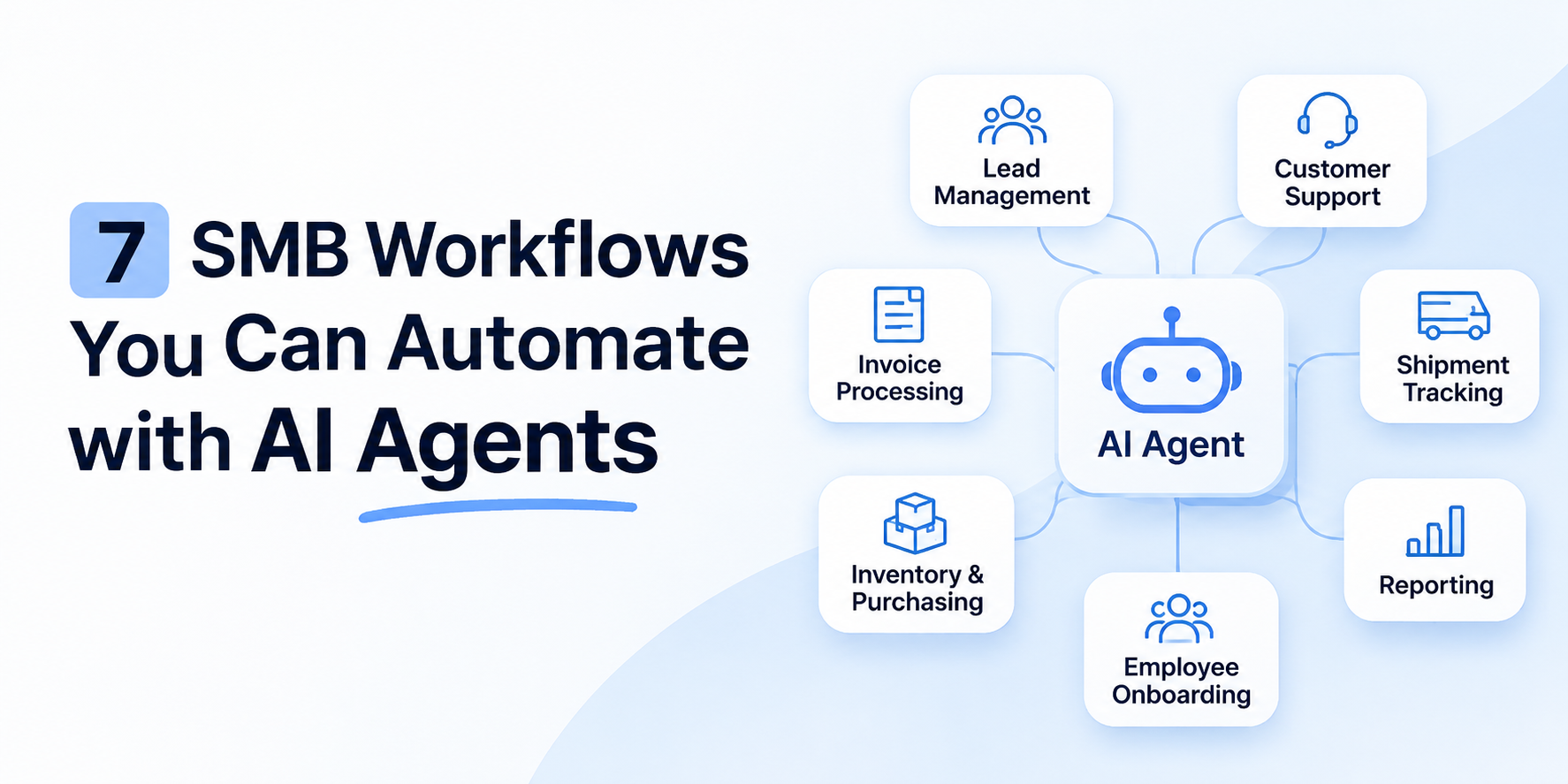
That's where AI agents for SMB automation deserve a closer look. They can handle workflows that involve more than a fixed trigger, such as matching supplier emails with purchase orders, identifying delayed shipments, or routing enquiries based on their actual requirements.
But not every process needs an AI agent. The real question is whether the workflow has enough volume, clear operating rules, and accessible data to justify one. This guide examines seven practical use cases, what each requires, and how to test the business value before committing to a larger build.
Not sure which process is worth automating? Book an SMB AI Readiness Assessment.
1. Lead Management: Get Every Enquiry to the Right Person
A new enquiry comes in asking for a custom software quote. Another asks about mobile app development. A third is from an existing client checking on a project. If all three land in the same inbox, someone has to read each message, identify what the person needs, check the CRM, and decide who should handle it.
That initial sorting can take up a surprising amount of sales time. An AI agent can take care of the first round of work:
- Read the enquiry: Pick out the contact details, company, location, requested service, budget, and project requirements.
- Check existing records: Search the CRM for the same contact or company before creating another entry.
- Route the lead: Assign it based on service type, sales territory, team availability, or your existing assignment rules.
- Prepare the response: Draft an acknowledgement using approved service information and details from the enquiry.
- Flag missed follow-ups: Create a task when a lead hasn't received a response within the agreed time.
There's one decision you should settle before building this workflow: what actually makes a lead qualified? If your sales team uses different criteria, the agent will produce inconsistent classifications. Start by letting it organize and route enquiries. Keep decisions about lead rejection, pricing, and commercial commitments with the sales team.
To see whether the workflow is paying off, compare enquiry response time, duplicate CRM records, lead assignment delays, and missed follow-ups before and after the pilot. Faster data entry is useful, but getting a genuine enquiry to the right salesperson before it goes cold is the outcome that matters.
2. Customer Support: Resolve Routine Requests Without Hiding Difficult Cases
A support agent is not valuable simply because it can answer FAQs. Its real operational value comes from connecting a customer's question to the correct order, account, service record, or support ticket.
Consider a customer asking why an order hasn't arrived. A basic chatbot might return a generic delivery policy. An integrated agent can look up the order, retrieve the latest shipment status, check whether the expected delivery date has passed, and prepare an answer based on the actual record.
It can also:
- Categorize incoming tickets by issue and urgency.
- Retrieve information from approved product documentation and support policies.
- Collect missing details before creating a ticket.
- Route technical problems, complaints, and refund requests to the right team.
- Record the interaction in the helpdesk or CRM.
Keep refund approval, compensation, contractual disputes, and sensitive complaints with authorized employees. Also define what happens when the agent cannot find a matching order. It should ask for clarification or escalate the request, not invent an answer.
Measure first-response time, ticket handling effort, escalation accuracy, repeat contacts, and the number of responses requiring correction.
3. Invoice Processing: Automate Preparation, Not Financial Authority
Invoice processing is a good candidate for AI because supplier documents don't always arrive in the same format. One supplier sends a structured PDF, another uses a scanned invoice, and another puts the purchase reference in an email.
An agent can extract the relevant fields, identify the supplier, match the invoice to a purchase order, and flag discrepancies. The accounting system should still apply the financial rules.
A sensible workflow looks like this:
- An invoice arrives in a designated inbox or document folder.
- The agent extracts supplier details, invoice number, dates, tax, line items, and total.
- It checks required fields and looks for duplicate invoice references.
- It compares the invoice against the purchase order and goods receipt, if available.
- It prepares the accounting entry and routes it for approval.
- Missing references, amount differences, and supplier changes go to an accounts employee.
The key is to distinguish document extraction from financial approval. AI can help interpret a document, but it should not independently authorize a payment or change supplier banking details.
Before choosing this workflow, check whether your accounting system exposes the necessary records through an API or another supported integration method. If employees still need to re-enter everything manually, the integration design—not the AI model—may be the main project.
4. Inventory and Purchasing: Identify the Cause of a Stock Problem
Inventory automation sounds straightforward until you examine the data behind a reorder decision.
A stock figure alone doesn't tell you whether to purchase more. You also need to consider recent sales, open customer orders, goods in transit, supplier lead times, minimum order quantities, and the cost of holding excess stock.
An AI-assisted inventory workflow can collect these signals and prepare a purchasing recommendation. For example, it might identify that a product is approaching its reorder threshold, but an open purchase order is already expected to arrive before the next demand cycle.
That prevents a common operational mistake: placing another order because the employee reviewing the stock sheet couldn't see the incoming shipment.
Use AI for interpreting supplier updates, identifying unusual demand patterns, and summarizing exceptions. Keep stock calculations and reorder thresholds in a controlled business rules layer. A language model should not be responsible for arithmetic that your inventory system can calculate deterministically.
A purchasing manager should approve orders, supplier substitutions, and unusual replenishment decisions. Measure stockouts, emergency purchases, excess stock, and time spent preparing purchase orders.
5. Shipment Tracking: Connect Carrier Updates to Customer Commitments
Consider a logistics company that receives shipment updates through carrier emails, spreadsheets, and tracking portals. Its operations team manually checks each update, finds the matching shipment, changes the internal status, and informs the customer when a delivery is delayed.
The problem is not just the number of updates. It's the work required to connect each update to the correct order and decide whether anyone needs to act.
An AI-assisted workflow can:
- Read updates from approved carrier emails, documents, or APIs.
- Extract the tracking number, shipment reference, location, and revised delivery estimate.
- Match the update against the internal shipment record.
- Classify the event as in transit, delivered, delayed, or requiring investigation.
- Update the logistics system when the match and status are reliable.
- Escalate unmatched records, conflicting dates, or missed delivery milestones.
- Prepare a customer notification using the verified shipment information.
Example: A carrier reports that a shipment will arrive two days later than planned. The agent matches the tracking number to the order, records the revised estimate, and flags the delay for the operations manager. The manager decides whether to notify the customer, arrange an alternative, or leave the existing commitment unchanged.
This workflow depends on reliable shipment identifiers and access to carrier data. If the same tracking reference is used across multiple records or employees maintain inconsistent order numbers, matching becomes a risk.
Track status-update time, unmatched shipment records, delay detection time, and customer notifications sent before the delivery commitment is missed.
6. Employee Onboarding: Coordinate the Work Across Departments
Onboarding often involves several teams but has no single owner for every step. HR collects documents, IT creates accounts, payroll needs employee information, and the reporting manager prepares the employee's first-week schedule.
An AI workflow can coordinate these tasks from an approved joining record.
It can create a role-specific checklist, request missing documents, assign tasks to HR and IT, send reminders, and answer routine policy questions from an approved knowledge base. It can also show HR which tasks remain incomplete before the joining date.
The difficult part is access control. The agent should only retrieve the employee information needed for its assigned tasks. It should not have broad access to compensation records, performance reviews, or unrelated personnel files.
Keep employment decisions, eligibility checks, compensation approvals, and sensitive HR matters under human control. Measure onboarding completion time, overdue tasks, missing documents, and administrative effort.
7. Management Reporting: Spend Less Time Preparing the Numbers
If your weekly management meeting starts with someone explaining why the sales spreadsheet doesn't match the CRM, you have a data and reporting problem.
An AI reporting workflow can collect approved information from different systems, prepare a summary, and flag changes that deserve attention. But it should not calculate financial metrics by interpreting raw numbers through a language model.
A better design separates the work:
- The CRM, accounting platform, helpdesk, or reporting database provides the source data.
- Defined calculations produce metrics such as revenue, conversion rate, overdue invoices, and ticket volume.
- The agent explains notable changes and prepares a management summary.
- The department head checks the underlying records before acting on the findings.
For example, the agent might flag that enquiries increased but qualified opportunities declined. It can point the sales manager toward the relevant reporting period and records. It cannot reliably explain the cause without further investigation.
Measure report preparation time, data completeness, correction frequency, and how quickly managers receive useful information.
Which Workflow Should You Automate First?
The most visible problem isn't always the best first project. A process that consumes a lot of employee time may still be a poor candidate if its rules change constantly or its data is unreliable.
Use this comparison to narrow the options.
|
Workflow
|
Main input
|
AI action
|
Human decision
|
Systems involved
|
Expected operational benefit
|
|
Lead management
|
Forms, emails, enquiry details
|
Extract, classify, match, route, draft follow-up
|
Qualification, pricing, negotiation
|
Website, email, CRM
|
Faster lead handling and fewer missed follow-ups
|
|
Customer support
|
Messages, orders, support history
|
Classify, retrieve records, prepare responses
|
Complaints, refunds, complex cases
|
Helpdesk, CRM, order system
|
Reduced routine ticket handling
|
|
Invoice processing
|
Invoices, purchase orders, receipts
|
Extract, compare, flag discrepancies
|
Payment and exception approval
|
Email, accounting, ERP
|
Less manual entry and faster preparation
|
|
Inventory
|
Stock, sales, open orders, supplier updates
|
Identify exceptions and prepare recommendations
|
Purchase approval
|
Inventory, ERP, supplier systems
|
Better replenishment visibility
|
|
Shipment tracking
|
Carrier updates and tracking records
|
Match, classify, update, escalate
|
Delivery exceptions and customer commitments
|
Email, carrier APIs, logistics system
|
Fewer manual status checks
|
|
Employee onboarding
|
Joining records, forms, policies
|
Create tasks, request documents, send reminders
|
HR and access approvals
|
HRMS, email, payroll, task tools
|
Better coordination across departments
|
|
Management reporting
|
CRM, finance, support, project data
|
Summarize verified metrics and flag changes
|
Interpretation and business action
|
CRM, accounting, helpdesk, BI
|
Less report preparation effort
|
A simple way to rank your candidates
Score each potential workflow from 1 to 5 against these criteria:
- Frequency: How often does the task happen?
- Manual effort: How much employee time does it consume?
- Process clarity: Are the steps and decision rules documented?
- Data access: Can the agent retrieve the information it needs?
- Exception risk: Can unusual cases be identified and escalated safely?
A high score for frequency and manual effort is useful, but it isn't enough. A workflow with unclear rules or poor data access may cost more to automate than it saves.
For a first pilot, prioritize a process with frequent activity, stable rules, accessible data, and a human owner who can review exceptions.
What You Need Before Building an AI Workflow
You don't necessarily need to replace your CRM, ERP, accounting platform, or helpdesk. The first question is whether the agent can access the right information and perform the required actions through supported integrations.
Check these five areas before approving development:
- Source data: Identify the system that owns each record. If shipment status comes from a carrier, your internal spreadsheet should not become the source of truth simply because it's easier to access.
- Integration access: Confirm API availability, authentication requirements, rate limits, and whether the agent can create or update records. A system that only supports manual exports may need additional integration work.
- Process rules: Document assignment criteria, approval limits, required fields, escalation conditions, and what happens when information is missing.
- Permissions: Define which records the agent can read, create, update, or submit for approval. Use role-based access rather than a shared administrator account.
- Exception handling: Decide what happens when two records conflict, an API fails, or the agent cannot identify the right customer or order. Every automated action should leave a trace that your team can review.
One more distinction matters: not every workflow needs an AI agent. If the task follows fixed conditions, conventional workflow automation is often simpler and cheaper. Use AI where the process requires interpretation of varied documents, messages, or context.
What a 30-Day AI Automation Pilot Should Look Like
A 30-day pilot is useful when the scope is narrow. It is not a promise that every custom AI system can be built and production-ready in a month. Complex integrations, poor source data, and security reviews can extend the schedule.
|
Period
|
Work
|
Decision or deliverable
|
|
Days 1–5
|
Map the current workflow, identify its owner, document exceptions, and record baseline performance
|
Approved scope and success measures
|
|
Days 6–10
|
Review data, APIs, permissions, system dependencies, and integration requirements
|
Technical feasibility and implementation plan
|
|
Days 11–17
|
Build the initial workflow, connect the required systems, and add approval and escalation steps
|
Working pilot in a controlled environment
|
|
Days 18–22
|
Test normal cases, missing data, duplicate records, conflicting information, and failed integrations
|
Test results and resolved critical issues
|
|
Days 23–27
|
Run a limited live trial with human approval enabled
|
Operational feedback and performance data
|
|
Days 28–30
|
Compare results with the baseline and review cost, accuracy, exceptions, and adoption
|
Go, revise, or stop decision
|
Define success before development
Choose three or four measures that reflect the original problem. For invoice processing, that might be handling time, extraction accuracy, exception rate, and cost per invoice. For shipment tracking, it could be manual update time, unmatched records, and delay detection time.
Calculate the monthly benefit using actual operational data:
Monthly net benefit = Value of time saved + Avoided rework costs − Monthly automation costs
Include model usage, hosting, integration maintenance, and human review in the automation costs. Don't count every minute saved as direct cash savings if employees will use that time for other work rather than reducing payroll.
At the end of the pilot, expand only if the workflow meets its acceptance criteria and employees can operate it without relying on constant developer intervention.
How Rushkar Approaches Custom AI Workflow Development
A workflow agent is only one part of the system. The surrounding software still needs to handle authentication, business rules, application integration, permissions, logging, and failure recovery.
That is why the first development discussion should focus on the process and its source systems, not on selecting an LLM. A custom implementation may combine an AI model for document or message interpretation with conventional code for calculations, database updates, and approval rules.
Rushkar's experience with custom operational software is relevant here. For Siddhesh Multiprint in Mumbai, a custom order-management dashboard helped the internal team process more than 1,000 orders and supported a 50x increase in new orders. It was a custom software outcome, not an AI-agent result. The relevant lesson is that workflow design and system fit matter when transaction volume grows.
For an SMB evaluating this type of project, the custom AI solutions for SMBs and AI agent development services provide a starting point for discussing the architecture and implementation scope.
Reduce delivery risk before committing to a larger rollout
A pilot should have a defined scope, named deliverables, test cases, and acceptance criteria. Without those, it is easy to end up paying for a demonstration that never becomes part of daily operations.
Rushkar's delivery model includes:
- Milestone-based payments: Tie payments to agreed delivery stages rather than treating the project as one undefined handover.
- Direct developer access and daily standups: Give your team a way to review progress and raise integration or process questions during development.
- Six-month post-delivery bug warranty: Covers bug fixes after delivery, subject to the agreed project terms.
- Deadline accountability: Rushkar's stated delivery model includes a financial penalty if an agreed deadline is missed, as defined in the engagement terms.
Before signing, make sure the statement of work identifies what counts as a completed milestone, which integrations are included, how acceptance testing works, and what is covered by the warranty. These details matter more than a broad promise to automate your operations.
Make the First Automation Decision a Small One
You don't need seven agents, a multi-agent architecture, or a company-wide AI program to start. Choose one workflow where manual effort is visible, the process can be explained, and the data is accessible.
Map the steps. Identify the decisions that must remain with employees. Set a baseline, test the workflow with real cases, and compare the results against agreed acceptance criteria. If the numbers justify it, expand to the next process. If they don't, fix the underlying workflow before investing further.
Not sure where AI fits in your business? Book an SMB AI Readiness Assessment.