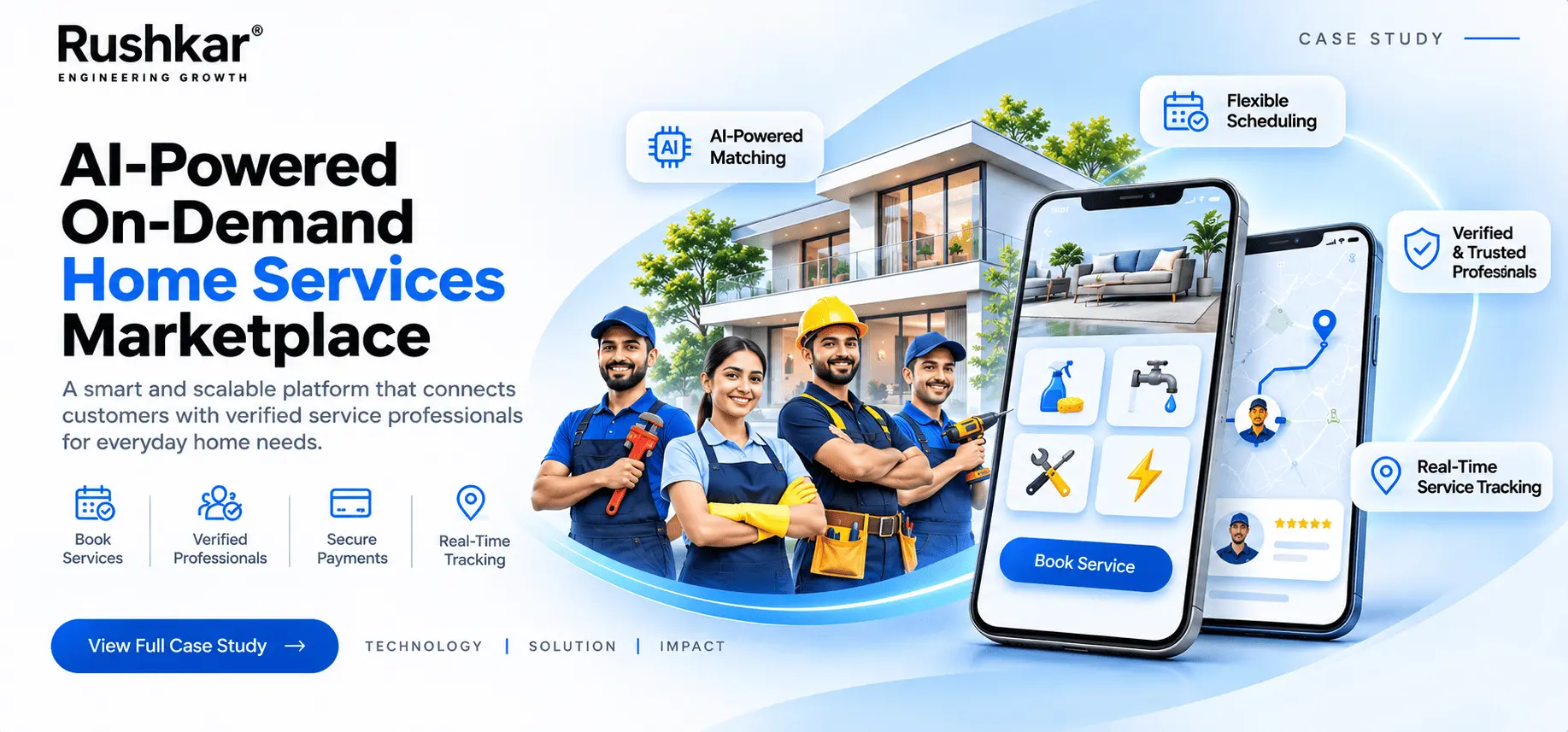
AI-Powered On-Demand Home Services Marketplace
Building a Digital Platform for Home Service Booking and Management
Rushkar Technology
01. Project Overview
A home service booking involves more than a customer selecting a service and choosing a time. The business also needs to manage its service catalogue, appointment availability, provider assignments, payments, and the information attached to each booking. These activities have to work together, even though customers, service providers, and administrators handle different parts of the process.
The client approached Rushkar with the requirement to build an on-demand home services marketplace that could support these operations through a connected digital platform.
The solution consists of three applications: a Customer Mobile Application, a Service Provider Mobile Application, and a Web-Based Admin Panel. Each application has a separate purpose. Customers use the mobile app to browse services, schedule appointments, make payments, and check their bookings. Providers use their app to access assigned jobs, review service information, and update progress through the available status functions. Administrators manage the catalogue, pricing, availability, bookings, providers, and other platform settings through the web panel.
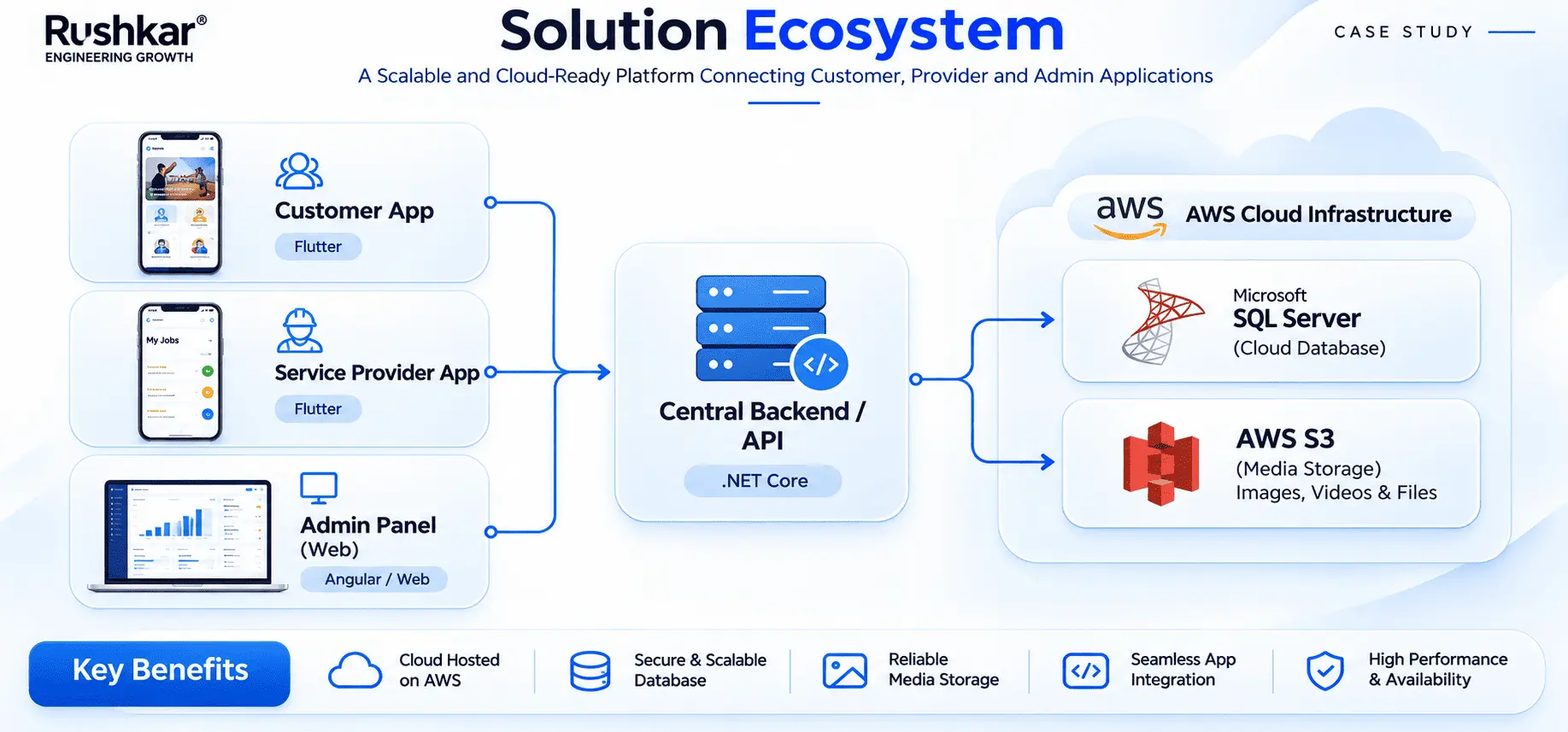
All three applications communicate with a shared .NET backend. Microsoft SQL Server maintains the application records, while AWS provides the hosting environment and image and media storage. External services support online payments, phone verification, push notifications, and location-related functions.
The project was focused on the complete booking operation, not only the customer-facing application. A booking needs to remain accessible to the people responsible for handling it, and administrators need control over the records that support the service.
AI scope: Despite the requested project title, AI functionality was implemented in the delivered platform. AI recommendations, forecasting, provider matching, and other intelligent features are discussed only as possible additions.
| Project Detail |
Information |
| Description |
On-Demand Home Services Marketplace |
| Project Type |
On-Demand Home Services Marketplace |
| Platforms |
Customer App, Service Provider App, Web Admin Panel |
| Mobile Development |
Flutter |
| Web Development |
HTML, CSS, JavaScript |
| Backend |
.NET |
| Database |
Microsoft SQL Server |
| Cloud Infrastructure |
AWS |
| Integrations |
Razorpay, Twilio, Firebase Cloud Messaging, Google Maps |
| Authentication |
Twilio OTP and JWT-based authentication |
| User Roles |
Customer, Service Provider, Administrator |
02. The Challenge
The main challenge was to coordinate customer bookings, service provider work, and administrative operations through one application system. Each area has its own requirements, but the information used by one group is often needed by another.
A customer selecting an appointment creates a record that matters to the provider and the administrator. The provider needs the job details. The administrator needs to manage the booking and its assignment. Payment information also needs to remain associated with the relevant transaction.
The project requirements covered six areas.
2.1 Fragmented Service Booking
Customers needed a direct way to browse service categories, review service information, select an appointment slot, and confirm a booking.
The booking process had to cover more than service discovery. Once a customer selects a service, the platform needs to handle the appointment information and retain the booking details for later access.
2.2 Service Provider Management
Providers needed a separate application to access their assigned jobs and the information related to each service request.
The business also needed administrative access to provider records and assignment functions. Provider management could not be limited to a list of names. The platform needed to connect provider information with the bookings and operational records managed by administrators.
2.3 Scheduling and Availability
The platform needed to support appointment slot selection for customers and availability management for administrators.
These two functions are connected. Administrators maintain the available slots, while customers select from the options presented during booking. The application needed to manage this information through the booking process.
The confirmed scope includes slot and availability management. It does not establish an automated scheduling engine or a system that independently calculates provider workloads.
2.4 Operational Visibility
Administrators needed access to customer records, provider information, service categories, pricing, bookings, and other platform settings.
These records support different parts of the operation. Service information affects what customers can browse. Provider records relate to assigned work. Booking information connects the customer request with the administrative process.
The Admin Panel needed to bring these management functions into one working interface.
2.5 Payment Management
Online payment was required as part of the customer booking process. The platform uses Razorpay for payment processing and provides administrators with access to payment and transaction information.
The payment function needed to fit into the booking flow rather than operate as a separate activity disconnected from the appointment.
2.6 Coordination Across Applications
The customer, provider, and administrator applications needed to work with the same application data.
A booking created by a customer becomes relevant to provider operations and administrative management. Keeping these records connected was a central requirement. It also meant that authentication, authorization, booking logic, and data access needed to be handled through a shared backend.
03. Project Objectives
The objective was to develop a connected home services platform that covered customer booking and the operational work behind each appointment.
The customer application needed to support registration, phone verification, service browsing, service details, appointment selection, booking confirmation, online payment, and access to booking history.
The provider application needed to give service providers access to assigned jobs, customer and service information, notifications, and the available functions for managing service progress. Job acceptance and status actions remain subject to the configured workflow.
The administrative application needed to give the business control over its service catalogue, pricing, customers, providers, appointment availability, bookings, provider assignments, and platform configuration.
The main development objectives were:
- Develop separate mobile applications for customers and service providers.
- Build a web-based Admin Panel for marketplace management.
- Support service browsing, appointment selection, and booking confirmation.
- Integrate Razorpay for online customer payments.
- Provide provider access to assigned jobs and relevant booking information.
- Support appointment slot and availability management.
- Implement OTP-based phone verification and JWT-based authentication.
- Maintain centralized application logic and data access.
- Connect the required notification and mapping services.
- Keep the application structure open to separately planned additions.
The focus was to make the three interfaces work as parts of one marketplace. Each role would have its own application experience, but the underlying booking and operational records would remain connected.
04. Our Solution
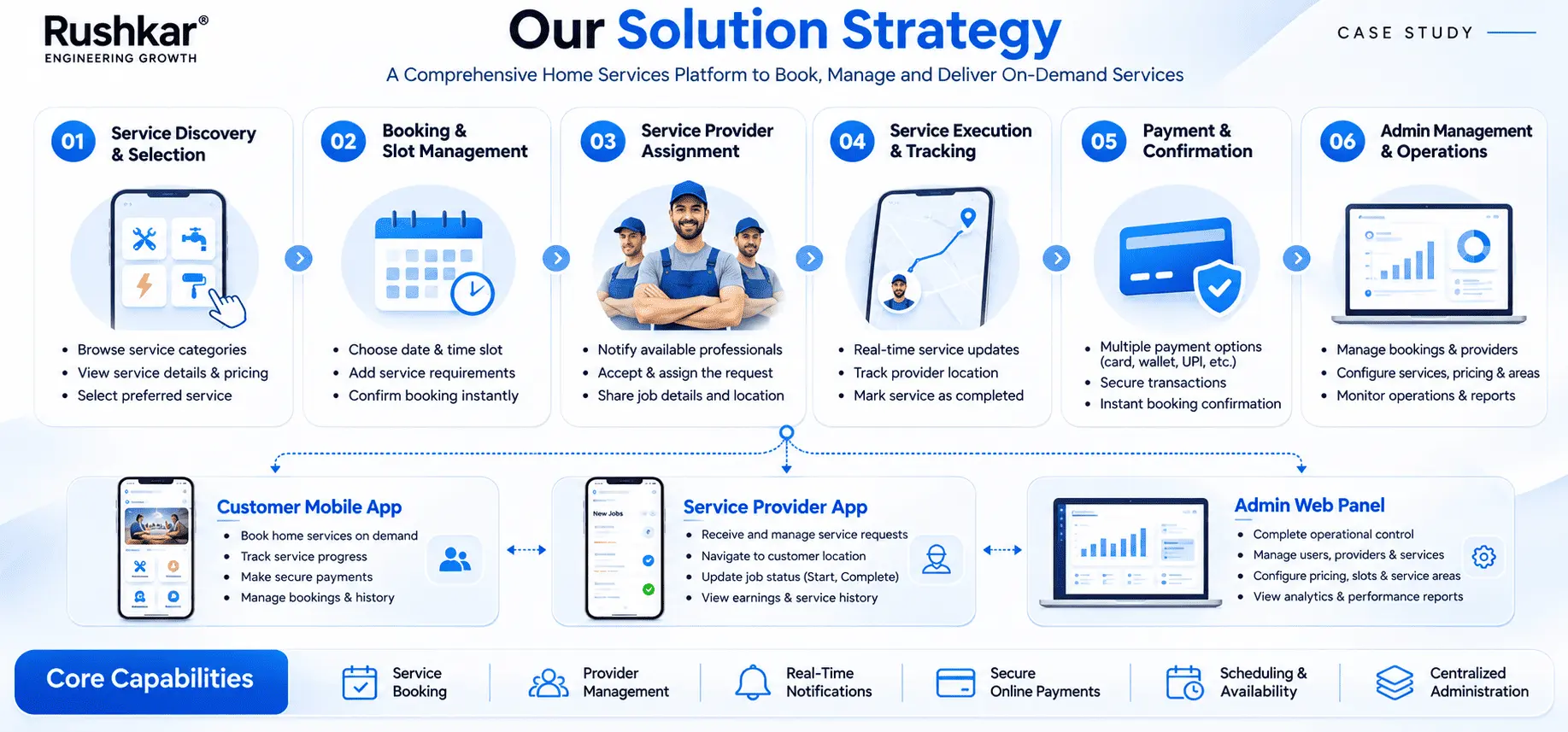
Rushkar developed a home services marketplace with two Flutter mobile applications and a web-based Admin Panel. A shared .NET backend handles the application logic and communication between these interfaces.
The three applications were designed around the work of their respective users. This separation matters because customers, providers, and administrators do not need the same screens or permissions.
4.1 Customer Mobile Application
The Customer App handles service discovery and appointment booking.
Customers can register or log in, verify their phone number through OTP, browse service categories, and review service details. After selecting a service, they can choose an available appointment slot, confirm the booking, and complete online payment through Razorpay.
The application also provides access to booking history, appointment details, and available status information. Notifications and reminders support communication around booking activity.
The main requirement was to keep the customer journey connected. Service discovery, appointment selection, booking confirmation, and payment belong to the same booking process.
4.2 Service Provider Mobile Application
The Service Provider App handles assigned work and job-related information.
Providers can log in securely, view bookings assigned to them, and open the details of a service request. The application provides relevant customer and service information, along with the available functions for managing service status and progress.
Provider availability and operational information are also supported where configured. Notifications provide updates related to assigned work.
Job acceptance and status management depend on the configured workflow. The project scope does not establish automatic dispatch or automatic provider matching.
4.3 Web-Based Admin Panel
The Admin Panel is the main interface for managing marketplace records and settings.
Administrators can manage customers, service providers, categories, subcategories, service catalogue entries, and pricing. They can also maintain appointment slots, availability, and operational areas.
Booking management and provider assignment are handled through this panel. Administrators can review booking information and assign or reassign providers according to the operational process. Payment and transaction information is also available for administrative review.
4.4 Centralized Backend and API Layer
The .NET backend connects the three applications and manages their core application logic.
It handles API communication, authentication, authorization, validation, booking operations, service and category data, appointment information, provider coordination, and communication with integrated services.
The shared backend means that the main application rules are not maintained separately inside each interface. Customer, provider, and administrative requests are processed through the same application layer.
4.5 Cloud-Based Infrastructure
AWS provides the cloud environment for application hosting, database hosting, and image and media storage. Microsoft SQL Server is used as the platform's relational database.
The mobile applications and Admin Panel access application data through the backend. They do not connect directly to the database.
This arrangement separates the interfaces from the application logic and data storage. It also gives the business a defined infrastructure to review as its application requirements change.
05. Key Features and Functionalities
The feature set follows the responsibilities of the three user groups. The Customer App handles booking, the Provider App handles assigned work, and the Admin Panel handles the records and settings behind marketplace operations.
5.1 Customer Mobile Application
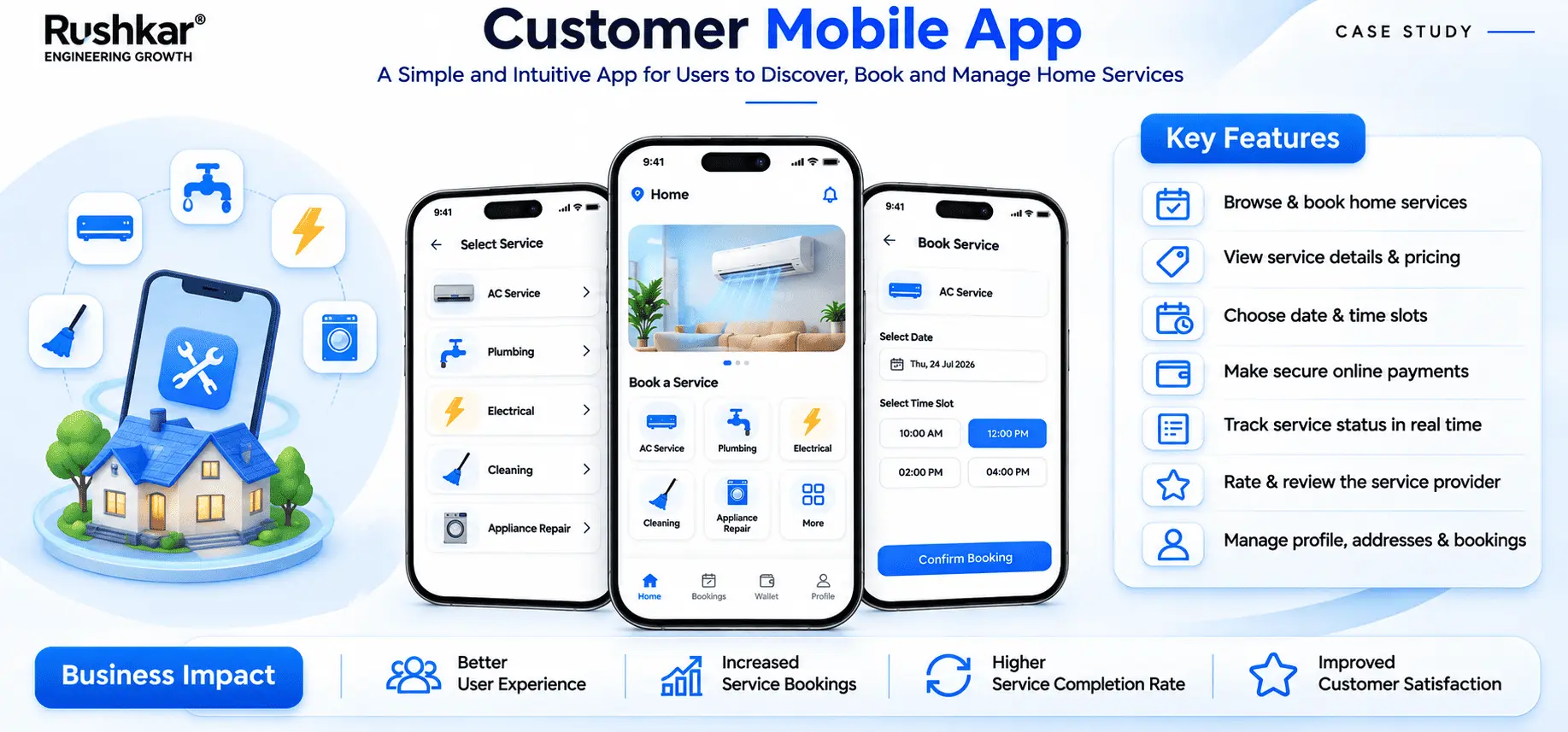
The Customer App provides the functions required to arrange and manage a home service appointment.
Customers can create an account, verify their phone number, browse service categories, and review service details before choosing an appointment. Once the booking information is submitted, the application supports confirmation and online payment.
The main functions include:
Customer registration and login.
Phone number verification through OTP.
Service category browsing.
Service selection and details.
Available appointment slot selection.
Appointment scheduling and booking confirmation.
Online payment through Razorpay.
Booking history and appointment details.
Booking status information.
Notifications and reminders.
Customer profile management.
Booking history gives customers access to their previous appointment records. Status information lets them check the booking details maintained by the platform. The application also supports notifications related to booking activity.
5.2 Service Provider Mobile Application
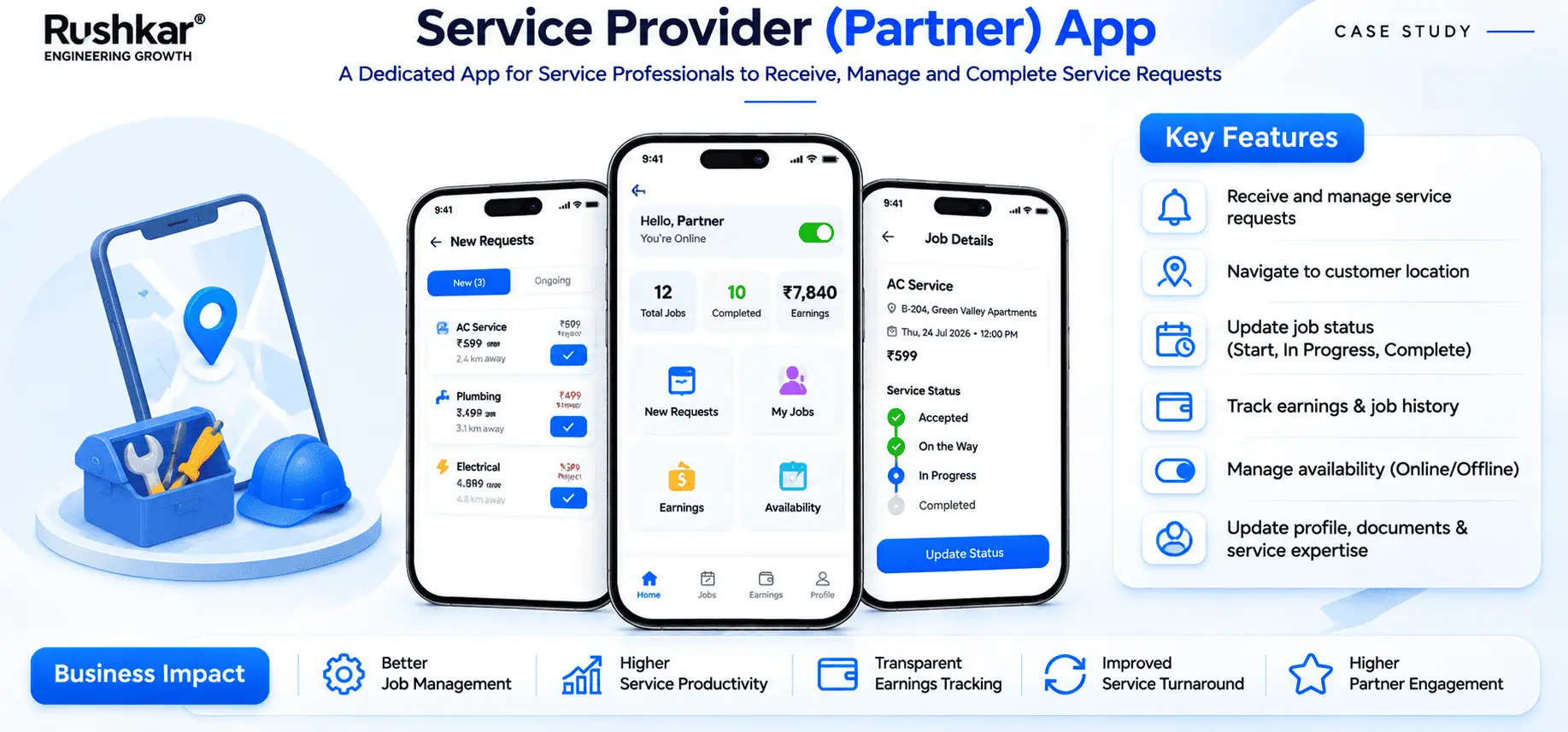
The Service Provider App gives providers access to the bookings assigned to them and the information required to handle those jobs.
After signing in, providers can open their assigned bookings and review the related appointment, customer, and service information. They can also use the available status functions to update service progress.
The application includes:
Secure provider login.
Assigned service and job visibility.
Booking details access.
Relevant customer and service information.
Job acceptance where applicable to the workflow.
Service status management.
Service progress updates.
Availability and operational information where configured.
Notifications related to assigned work.
Provider profile management.
The provider interface is organized around assigned jobs. It does not expose the broader catalogue, pricing, and platform configuration controls available to administrators.
5.3 Web-Based Admin Panel
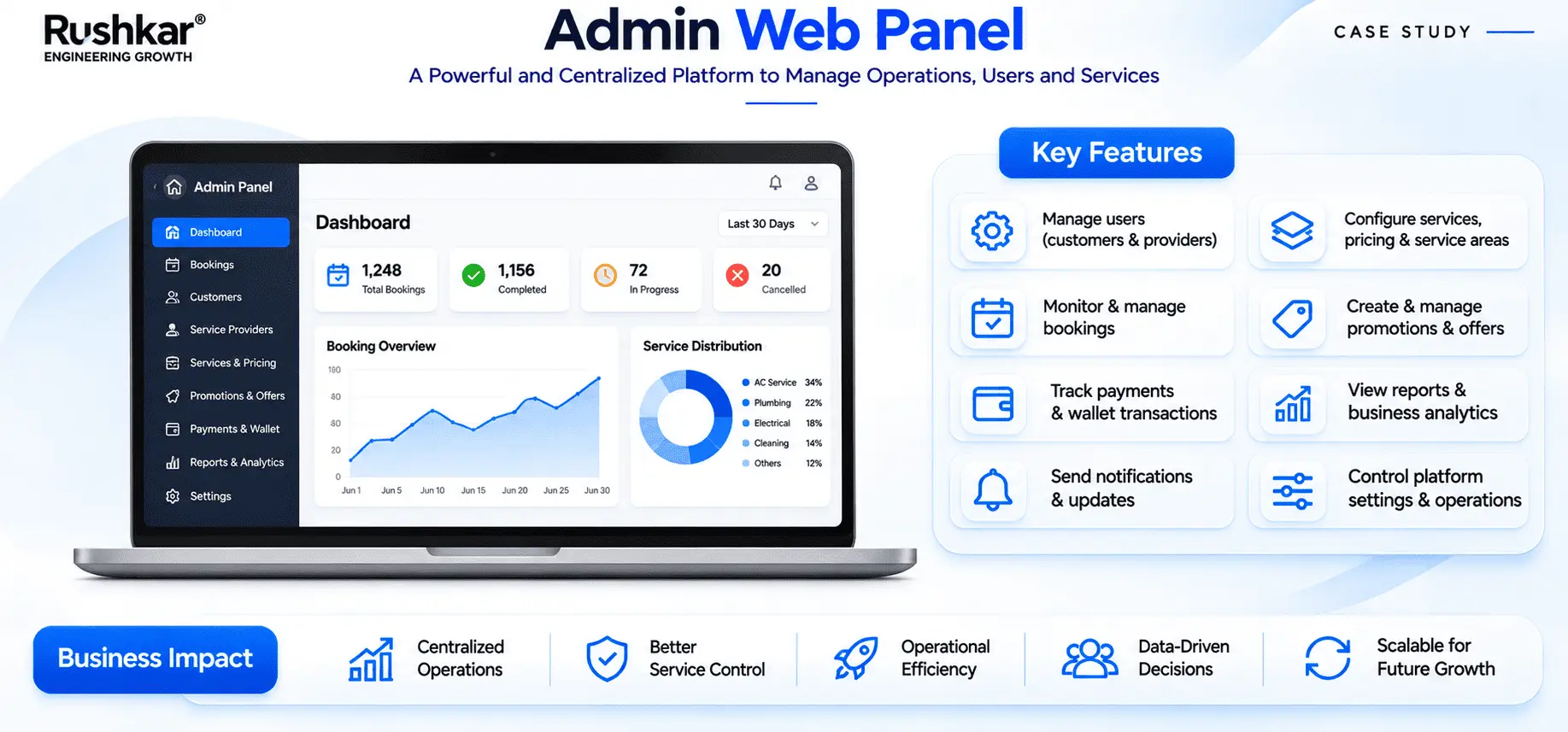
The Admin Panel gives authorized staff access to the management functions required to run the marketplace.
Its main functions include:
Dashboard and operational overview.
Customer management.
Service provider management.
Service category and subcategory management.
Service catalogue management.
Service pricing configuration.
Appointment slot and availability management.
Operational area management.
Booking and appointment management.
Provider assignment and reassignment.
Payment and transaction visibility.
Platform configuration and administration.
These functions cover the administrative side of the booking process. Staff can maintain the service catalogue, manage provider records, review bookings, and work with availability and pricing settings.
The panel also gives administrators access to payment-related information. The source does not establish advanced financial functions such as commissions, provider payouts, refunds, or wallet management.
06. AI Opportunities and Intelligent Enhancements
AI functionality was not included in the delivered platform. The current application uses defined business logic and the integrations described in this case study.
There are, however, several areas the business could assess separately as its operational data develops. These ideas would need their own requirements, data checks, and development work.
6.1 Service Recommendations
A recommendation feature could use customer activity and previous booking records to suggest relevant services.
The platform maintains service and booking information that could be considered for this purpose. Before developing such a feature, the business would need to decide which customer signals are relevant and how recommendations should be presented.
6.2 Scheduling Suggestions
A scheduling model could study appointment history and provider availability to suggest suitable time slots.
This would require reliable availability data and clearly defined scheduling constraints. The current platform supports appointment selection and availability management, but does not include AI-based scheduling.
6.3 Demand Forecasting
Demand forecasting could examine historical booking patterns across service categories and operational areas.
The purpose would be to help the business plan service capacity and provider availability. The usefulness of such forecasts would depend on the quality and coverage of the historical data.
6.4 Provider Matching Assistance
A provider matching feature could consider service requirements, provider details, location, and availability when suggesting an assignment.
The current platform supports provider management and manual assignment or reassignment through the Admin Panel. Automated or AI-based matching was not delivered.
6.5 AI-Assisted Customer Support
A conversational support feature could help customers find information about services, understand booking steps, and get answers to common questions.
Such a feature would need approved support information and a clear process for requests that require an administrator or customer support representative.
6.6 Operational Insights
An analytics or AI-assisted reporting layer could examine booking activity, service demand, and provider operations to identify patterns.
Before adding this capability, the business would need consistent reporting definitions and reliable data. The current project includes a dashboard and operational overview, not an AI analytics engine.
| Potential Enhancement |
Possible Business Use |
Current Status |
| Service recommendations |
Suggest services based on relevant customer activity |
implemented |
| Scheduling suggestions |
Support appointment planning |
implemented |
| Demand forecasting |
Study booking patterns across services and areas |
implemented |
| Provider matching assistance |
Help administrators assess suitable providers |
implemented |
| AI-assisted support |
Respond to common customer enquiries |
implemented |
| Operational insights |
Identify patterns in booking and provider activity |
implemented |
These are possible additions, not part of the delivered implementation. Each would need a separate assessment of business value, data availability, technical requirements, and operating cost.
07. UI/UX Design Approach
The design work followed the tasks each user needs to complete. Customers, providers, and administrators work with the same marketplace, but their daily requirements are different.
7.1 Customer Booking Interface
The customer interface focuses on service discovery and appointment booking. Users need to browse categories, review service information, select an appointment slot, confirm the booking, and make payment.
The sequence of these actions matters. Customers should be able to understand what they are selecting before moving to the appointment and payment steps.
7.2 Provider Work Interface
The provider interface focuses on assigned bookings and job information.
Providers need access to the service request, appointment details, customer information, and available status functions. The application keeps these work-related functions separate from the customer browsing and administrative management areas.
7.3 Admin Management Interface
The Admin Panel is designed around the records administrators manage. Customer and provider information, service listings, categories, pricing, availability, bookings, and provider assignments are separate areas of administrative work.
The interface needs to make these records accessible without mixing them with the customer booking flow.
7.4 Consistent Interface Structure
The three applications use separate layouts because their functions are different. At the same time, the design process considered their relationship as parts of one product.
Wireframes and interface layouts were prepared before development. The client reviewed the proposed designs and workflows as part of scope alignment.
Actual application screens should be used in the final showcase. They will give readers a direct view of the delivered customer, provider, and administrative interfaces.
08. User Journey and Workflow
The marketplace workflow connects a customer request with provider operations and administrative oversight. Each role handles a different part of the service lifecycle.
8.1 Customer Journey
The sequence starts with service discovery and ends with a booking record that remains accessible through the application. The provider and administrator use related information through their own interfaces.
1
The customer opens the mobile application.
2
The customer registers or logs in.
3
Phone verification is completed through OTP where required.
4
The customer browses service categories.
5
A service is selected and its details are reviewed.
6
The customer chooses an available appointment slot.
7
The booking information is submitted and confirmed.
8
The customer completes online payment through Razorpay.
9
The backend processes the booking information.
10
The relevant booking details become available for the next operational steps.
11
The customer can access booking information and receive relevant notifications.
The sequence starts with service discovery and ends with a booking record that remains accessible through the application. The provider and administrator use related information through their own interfaces.
8.2 Service Provider Journey
1
The provider logs in securely.
2
Assigned bookings are displayed in the Provider App.
3
The provider opens a booking and reviews the service details.
4
Customer and appointment information is available for the assigned job.
5
Job acceptance functions are used where applicable to the workflow.
6
The provider uses the available status functions to record service progress.
7
Relevant updates are maintained within the platform.
The provider workflow is based on assigned bookings. The supplied project information does not confirm live location tracking, automated dispatch, or route-based job allocation.
8.3 Administrative Journey
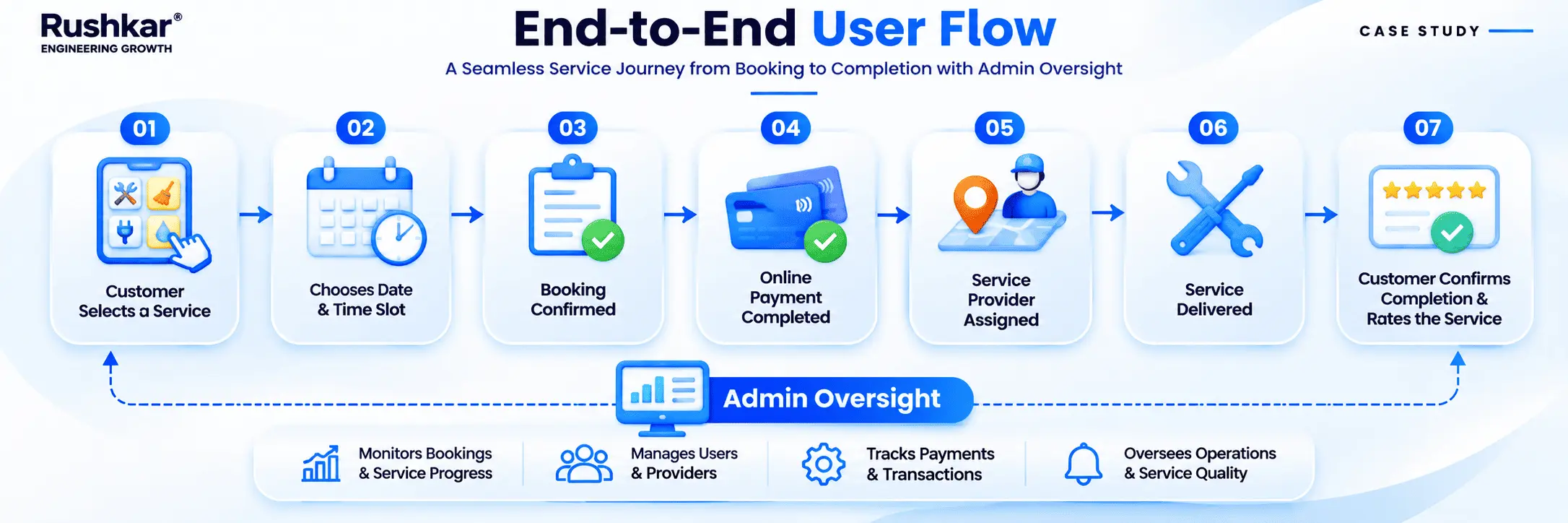
1
The administrator logs in to the web Admin Panel.
2
The dashboard provides an operational overview.
3
Customer and provider records are managed.
4
Service categories, subcategories, and catalogue entries are maintained.
5
Pricing and operational areas are configured.
6
Appointment slots and availability are managed.
7
Bookings are reviewed through the administrative interface.
8
Providers can be assigned or reassigned as required.
9
Payment and transaction information is available for review.
10
Platform settings are maintained through the available configuration functions.
The Admin Panel gives staff access to the controls behind the booking process. It does not replace the customer or provider applications. It handles the administrative work that supports them.
09. System Architecture
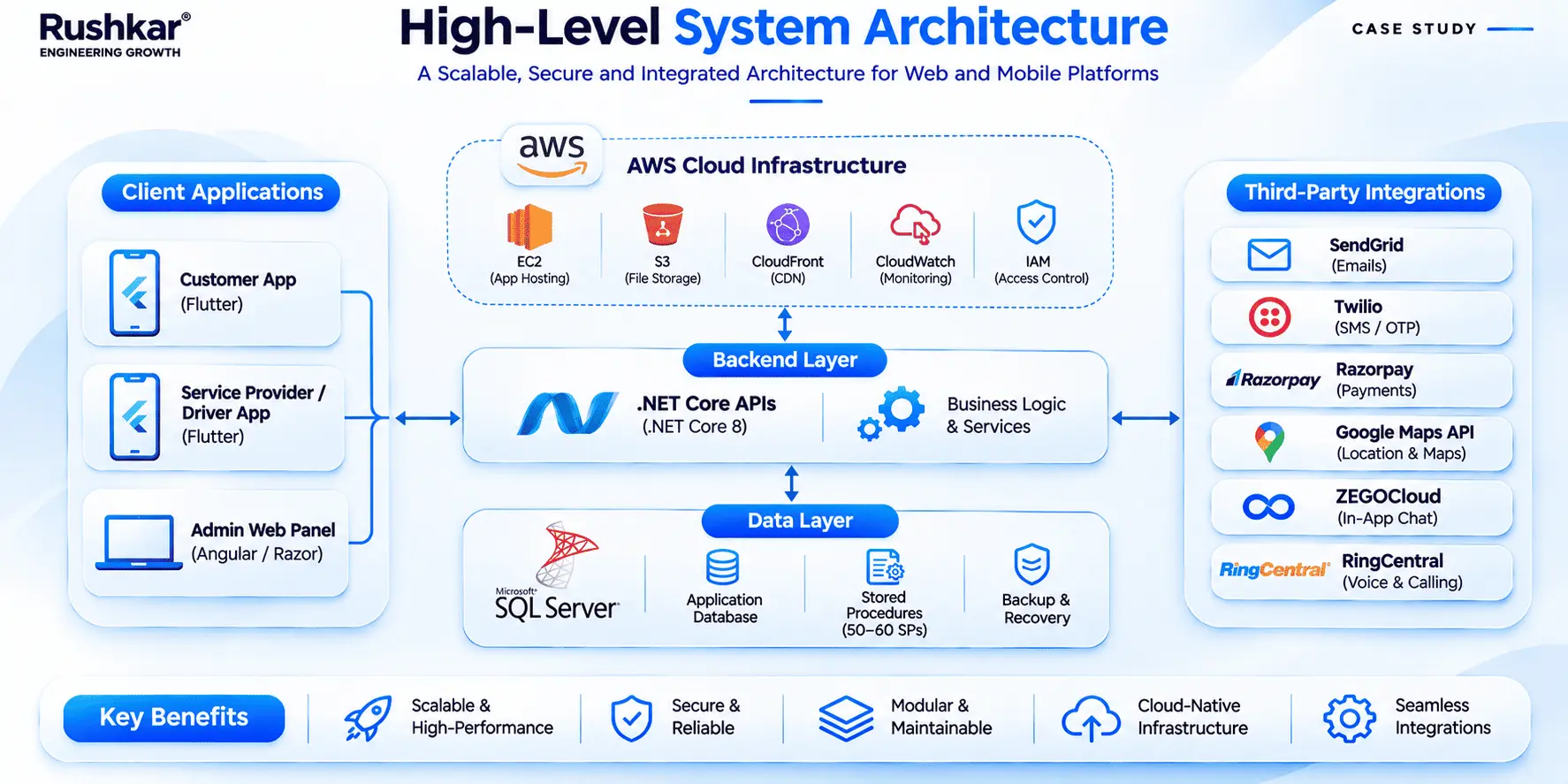
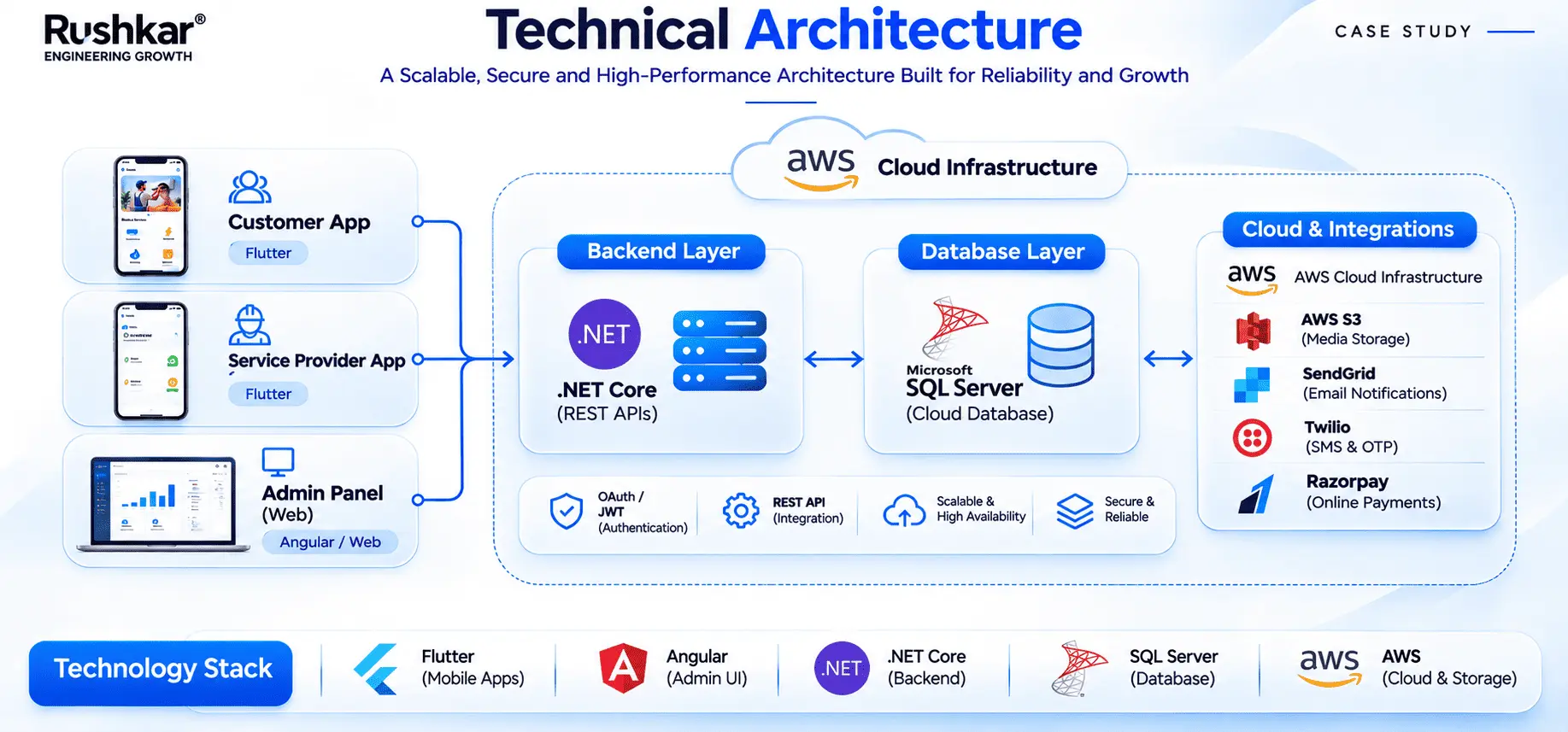
The platform uses a centralized application architecture. The mobile applications and web Admin Panel communicate with a shared backend, which processes application requests and accesses the database and integrated services.
9.1 Presentation Layer
The presentation layer consists of three interfaces:
Flutter Customer Mobile Application.
Flutter Service Provider Mobile Application.
HTML, CSS, and JavaScript-based Admin Panel.
Each interface presents functions according to the user's role. Customers work with service discovery and bookings. Providers work with assigned jobs. Administrators manage marketplace records and settings.
9.2 Application and Business Logic Layer
The .NET backend handles the business logic and API services used by the applications.
Its responsibilities include authentication, authorization, request validation, service and category data retrieval, booking operations, appointment and availability handling, provider coordination, and communication with integrated services.
The backend also manages requests from the Admin Panel. This keeps the main application rules within one layer rather than placing separate versions of those rules inside each interface.
9.3 Data Layer
Microsoft SQL Server is the primary relational database for the platform.
It stores customer and provider records, service categories and catalogue information, pricing, booking and appointment details, availability, payment-related records, and administrative data.
These records support the different application workflows. A booking, for example, relates to a customer, a selected service, and appointment information. Provider and payment records may also be associated with the booking according to the operation.
9.4 Cloud Infrastructure Layer
AWS provides the cloud environment used for application hosting, database hosting, and image and media storage.
The supplied project information does not identify individual AWS products or a more detailed infrastructure topology. This case study therefore describes the confirmed hosting responsibilities without assuming specific services or deployment configurations.
10. Application Architecture
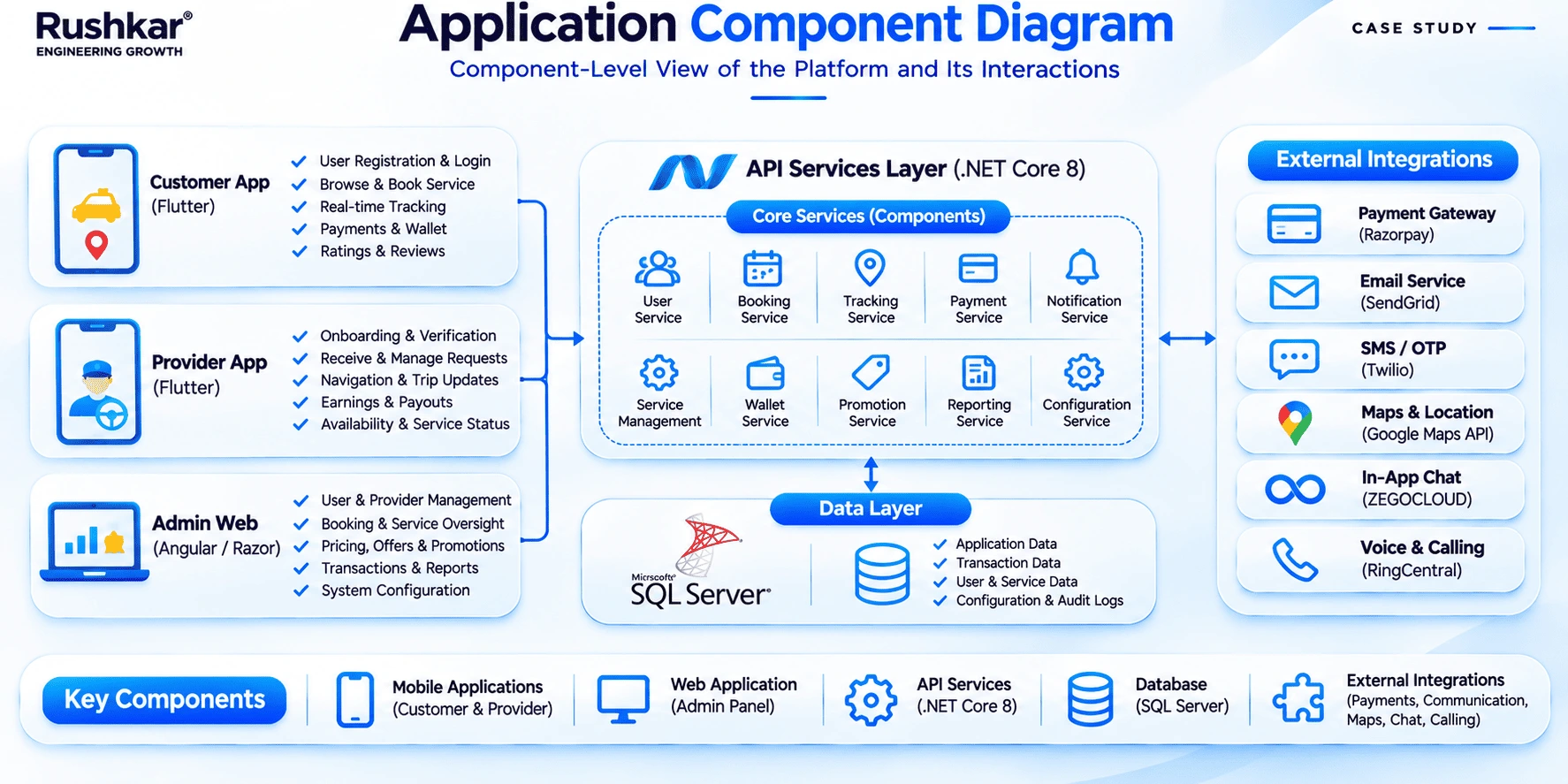
The application architecture separates the mobile and web interfaces from backend processing and data storage. This gives each part of the product a defined responsibility.
10.1 Mobile Application Architecture
Flutter was used for both mobile applications.
The Customer App and Service Provider App share the same development technology but serve different user workflows. The customer interface handles service discovery, appointments, payments, and booking information. The provider interface handles assigned bookings, job details, and service progress.
Both applications communicate with the shared backend. They do not maintain separate copies of the main marketplace business logic.
10.2 Web Application Architecture
The Admin Panel uses HTML, CSS, and JavaScript.
It provides the administrative interface for customer and provider management, service catalogue configuration, pricing, availability, bookings, and provider assignments. Requests are sent to the backend through APIs.
The web interface is separate from the mobile applications because administrative tasks have different screen and information requirements.
10.3 Centralized API Communication
The applications communicate with the .NET backend through APIs.
This arrangement keeps business logic and data processing centralized. When an application requests service information or submits a booking, the backend handles the request and works with the relevant application records.
It also gives the backend a common place to manage authentication, authorization, and validation across the three interfaces.
10.4 Modular Functional Structure
The platform contains separate functional areas for customer booking, provider operations, administration, and supporting integrations.
These areas have different responsibilities but use the same application backend. In general, keeping functions separated makes it easier to review a particular part of the system when requirements change, without treating the entire application as one block of code.
The source confirms the platform's separate interfaces and functions. It does not provide a detailed code-level module map, so specific internal module names have not been assumed.
11. Backend and API Architecture
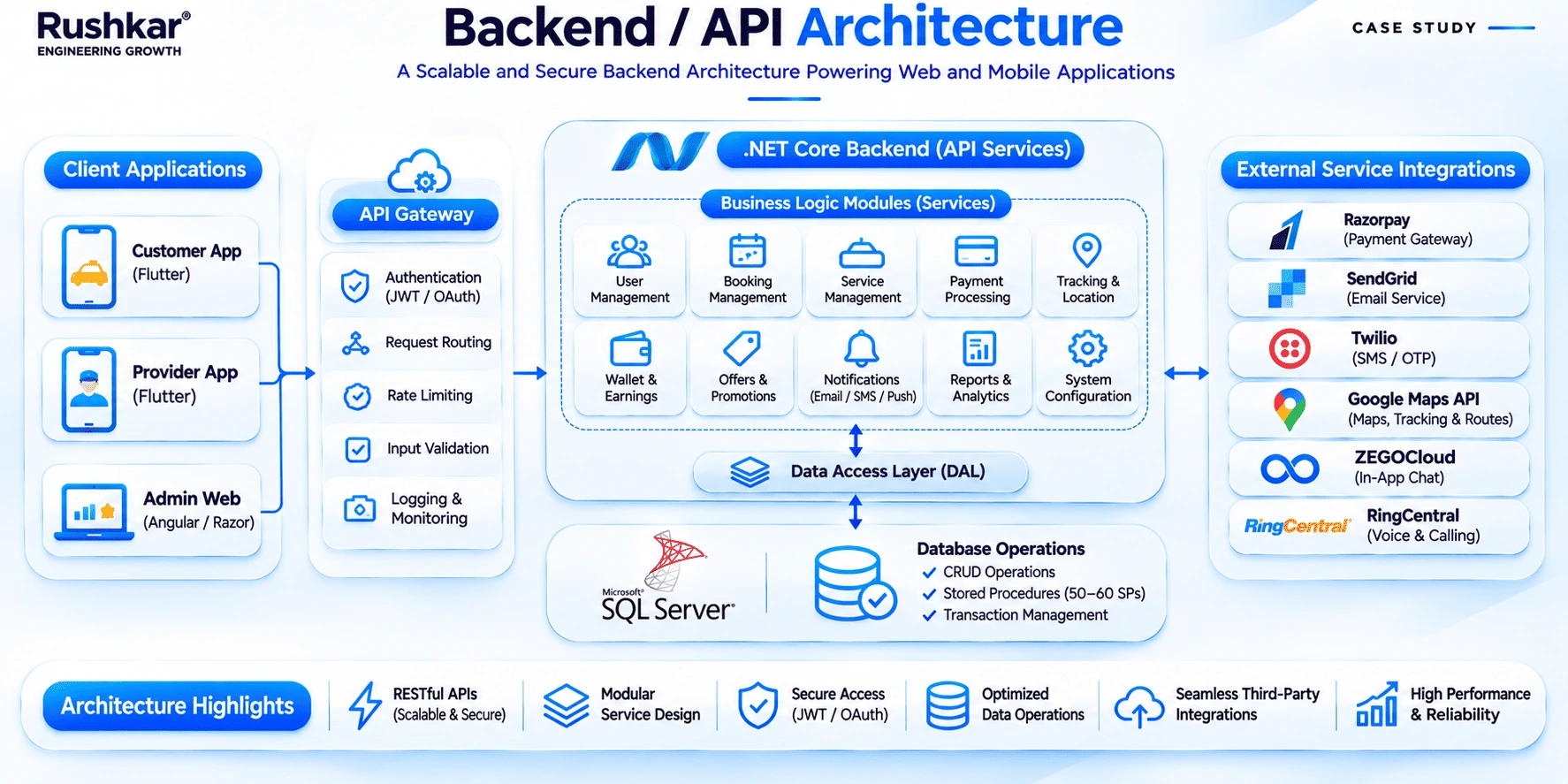
The .NET backend handles the application logic and communication used by the Customer App, Provider App, and Admin Panel.
11.1 Business Logic Management
The backend manages the main application operations, including service and category data, booking creation and management, appointment and availability handling, provider coordination, authentication, authorization, and status updates.
These functions sit behind the application interfaces. The mobile and web applications request the required operations through the API layer.
11.2 API-Based Communication
APIs connect the mobile applications and Admin Panel with the backend.
The Customer App uses backend services for service information, booking operations, authentication, and payment-related communication. The Provider App uses the backend to access assigned bookings and update the available service status information. Administrators use the API layer to manage service, provider, booking, and configuration records.
11.3 Booking and Scheduling Logic
The backend processes the information submitted during booking and handles the application logic associated with appointments.
The customer selects a service and an available slot. The backend processes the booking request and maintains the related information. Administrators manage the availability settings through the Admin Panel.
The source confirms booking and availability functions, but does not describe the internal validation rules or a specific conflict-resolution mechanism. Those implementation details should be confirmed with the development team before they are documented.
11.4 Centralized Data Processing
The backend accesses the database and processes application requests centrally.
This means that customer, provider, and administrative interfaces work with the same application records. The main business rules are handled through the backend instead of being independently implemented in each client.
11.5 Integration Management
The backend supports communication with the external services used by the platform.
These include Razorpay for online payments, Twilio for OTP and SMS, Firebase Cloud Messaging for push notifications, and Google Maps for location and mapping functions.
The exact request and response handling for each integration is not described in the supplied source. The case study therefore limits the explanation to each service's confirmed purpose.
12. Database Architecture
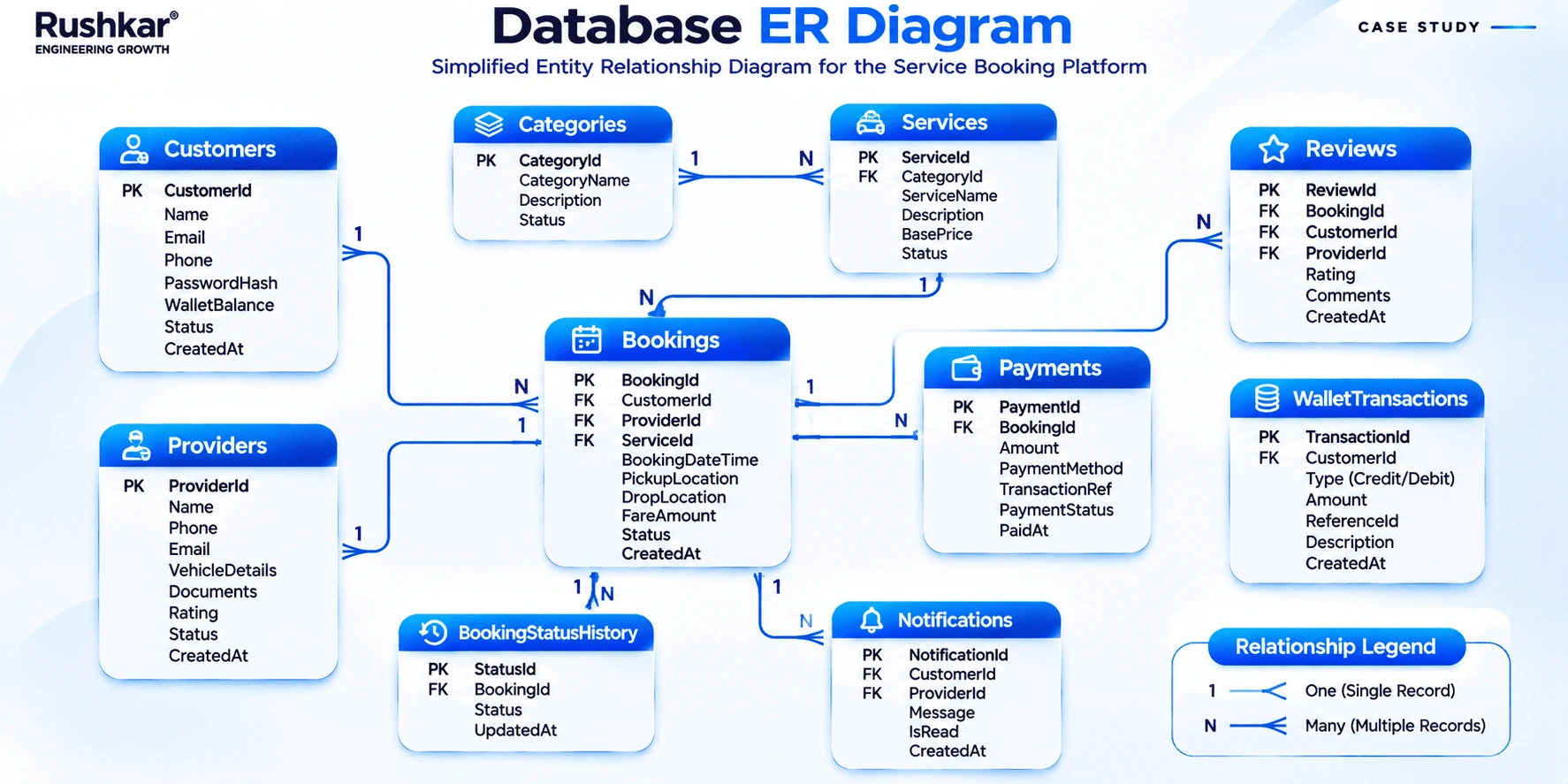
Microsoft SQL Server was used as the platform's relational database. It stores the records required by customer booking, provider operations, and administration.
12.1 Structured Data Management
The database maintains the main application information, including:
Customer and service provider records.
Service categories and service catalogue information.
Pricing and platform configuration.
Booking and appointment records.
Appointment availability information.
Payment-related records.
Operational and administrative data.
These records support different parts of the marketplace. Service information is used during browsing and booking. Provider information is required for assigned work. Booking records are relevant to customers and administrators, while payment-related records support transaction visibility.
12.2 Relational Data Organization
A relational database is suitable for records that have defined relationships.
In this platform, a booking relates to a customer, a selected service, and appointment information. Provider and payment records may also be linked to the relevant booking, depending on the operation.
This structure gives the application a way to maintain related information rather than treating every record as an isolated entry.
12.3 Centralized Data Access
The applications access database records through the .NET backend.
The Customer App, Provider App, and Admin Panel do not connect directly to SQL Server. The backend handles requests, processes the application logic, and accesses the required data.
This keeps data access within the application layer and allows the backend to manage requests from the different user roles.
12.4 Cloud Database Deployment
Microsoft SQL Server is hosted within the AWS environment.
The database supports the platform's centralized application data requirements. AWS also provides the application hosting and media storage environment.
The source does not identify a specific AWS database service or hosting configuration, so those details are not included here.
13. Third-Party Integrations
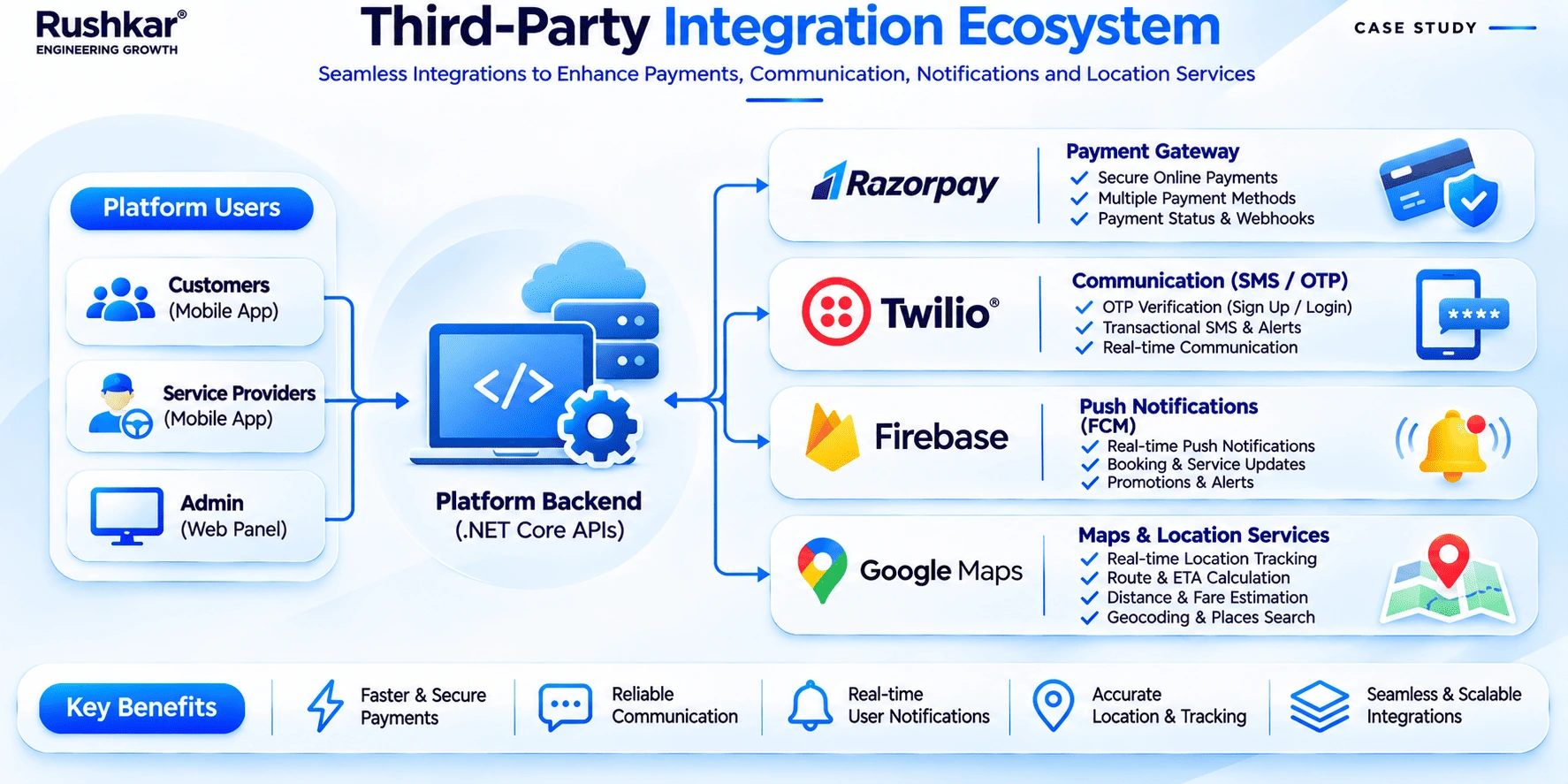
The platform uses external services for functions that support the booking and application workflows. Each integration has a defined role.
13.1 Razorpay: Payment Gateway
Razorpay handles online customer payments.
The integration is used within the booking process, allowing customers to complete payment through the configured gateway. The platform also maintains payment and transaction information for administrative visibility.
The supplied project scope does not confirm refunds, wallets, commissions, provider payouts, or split payments. These functions should not be treated as part of the delivered payment system.
13.2 Twilio: OTP and SMS
Twilio supports phone number verification through OTP and SMS-related communication.
OTP is used during the relevant authentication step to verify access to the phone number provided by the user. Twilio also supports the SMS functions configured within the application.
13.3 Firebase Cloud Messaging: Push Notifications
Firebase Cloud Messaging is used to deliver push notifications to the mobile applications.
The integration supports communication with customers and providers through their mobile apps. Notifications can provide relevant booking and service-related updates according to the configured application flow.
The project source does not list every notification event, trigger, or message template. Those details should be confirmed before adding more specific claims.
13.4 Google Maps: Location and Mapping
Google Maps supports location-related functionality and mapping within the platform.
Location information is relevant to a home services marketplace because service requests and operational areas can be associated with places. The integration provides the mapping support required by the configured application functions.
Live provider tracking, geofencing, route optimization, and arrival-time calculations are not confirmed in the project scope.
14. Security and Authentication
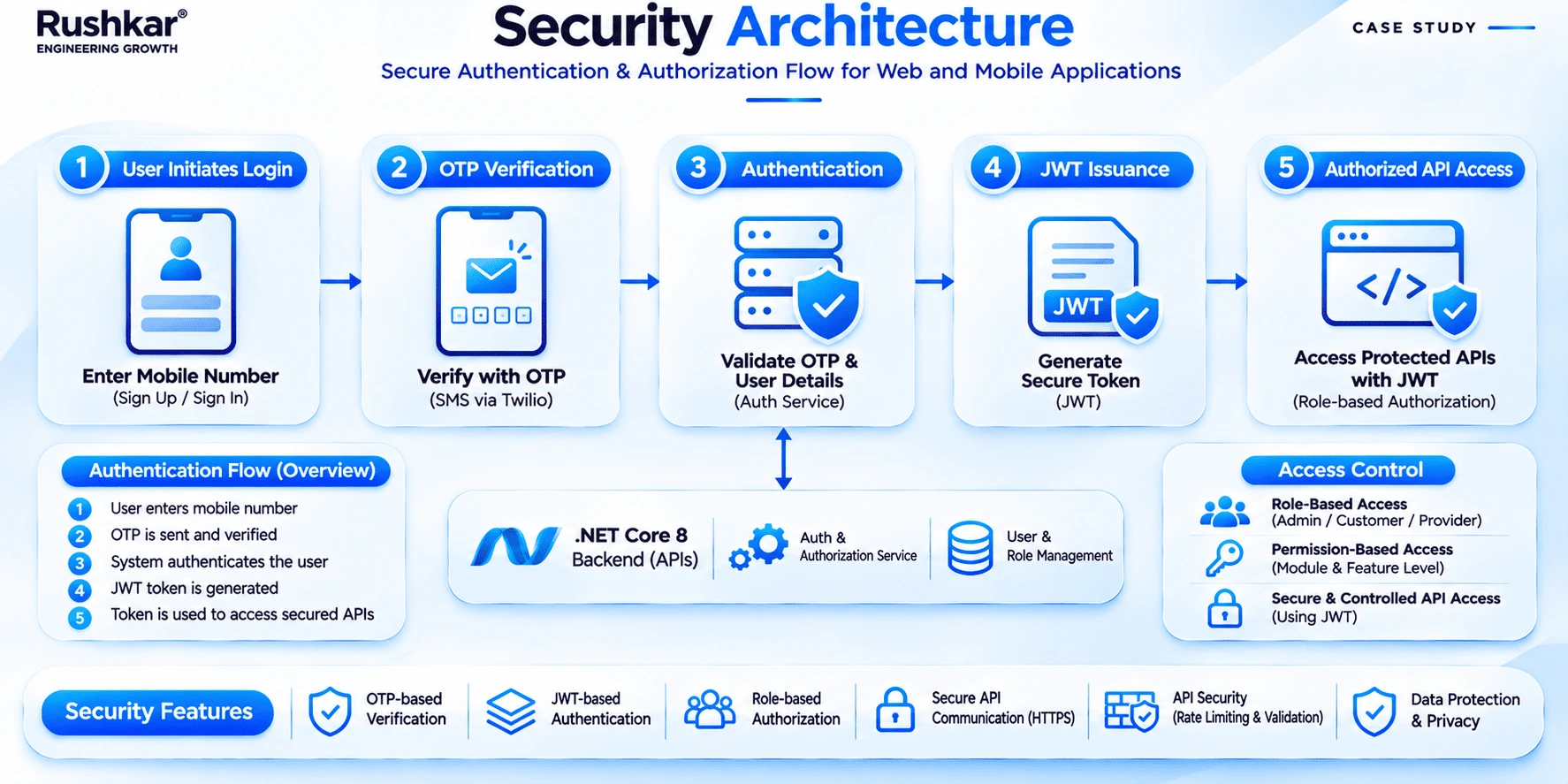
The platform uses phone verification, JWT-based authentication, API authorization, and role-based access to control application access.
14.1 OTP-Based Phone Verification
Twilio is used to verify phone numbers through OTP.
This provides a verification step during the relevant registration or login process. It checks access to the phone number supplied by the user.
14.2 JWT-Based Authentication and Authorization
JSON Web Tokens are used for session management and API authorization.
JWT supports authenticated requests to protected backend resources. The backend handles authentication and authorization for the application operations requested by each interface.
The project source confirms JWT usage but does not specify token expiry, refresh-token handling, signing algorithms, or other token configuration details.
14.3 Role-Based Access
The platform has three main user roles: Customer, Service Provider, and Administrator.
Each role uses a different application interface and has access to functions related to its responsibilities. Customers use booking and profile functions. Providers access assigned jobs and service information. Administrators manage marketplace records and configuration.
14.4 Centralized Security Controls
Authentication and authorization are handled through the backend.
This gives the applications a shared point for access control rather than requiring each interface to manage the complete authentication process independently.
The backend also handles API validation as part of application request processing.
14.5 API Communication
The API layer acts as the communication point between the applications and backend services.
Application requests are processed through this layer before the backend accesses the relevant records or connected services. The mobile and web interfaces do not connect directly to the database.
The supplied source does not document encryption methods, security certifications, or regulatory compliance. Those claims have not been added.
15. Deployment and Infrastructure
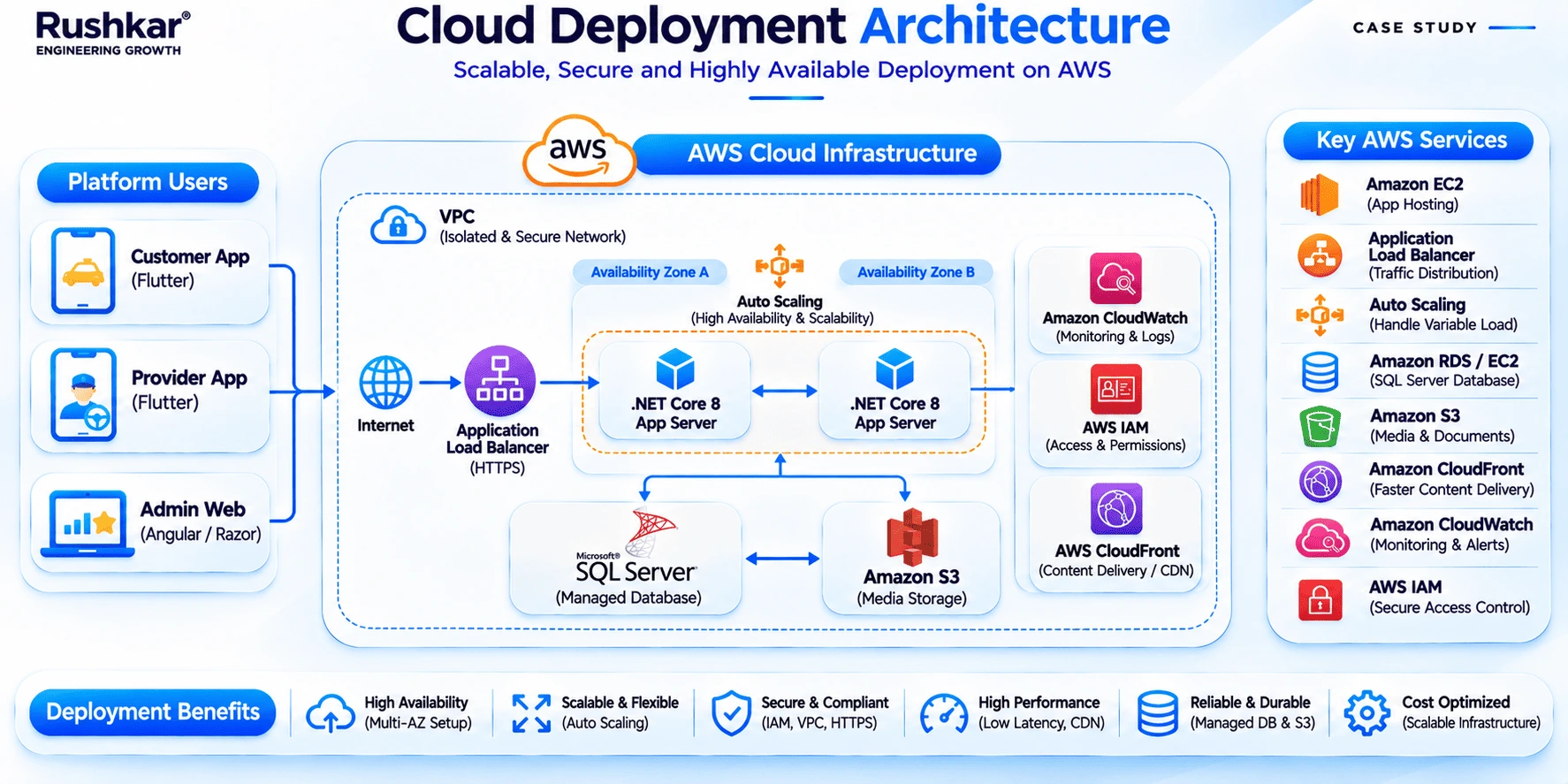
The platform uses AWS for application hosting, database hosting, and image and media storage.
15.1 AWS Cloud Hosting
AWS provides the environment in which the platform's application components are hosted.
The backend supports requests from the mobile applications and Admin Panel. The cloud environment also supports the database and media storage requirements.
15.2 Database Hosting
Microsoft SQL Server is hosted within AWS.
The database maintains the platform's application records and is accessed through the backend. This keeps data requests within the centralized application architecture.
15.3 Image and Media Storage
AWS is used for image and media storage.
This supports the media-related requirements of the application. The source does not identify a specific AWS storage product, so no product-level deployment claim is made.
15.4 Infrastructure Management
The application, database, and media storage components run within the AWS environment.
As operational requirements change, the infrastructure can be reviewed against actual usage, storage needs, and application activity. Any specific changes to hosting capacity or deployment configuration would require technical assessment.
16. Scalability and Performance Considerations
The platform uses a shared backend, a relational database, and separate interfaces for customer, provider, and administrative work. These are the confirmed architectural elements that can be reviewed as the application develops.
16.1 Centralized Backend
The .NET backend manages application logic and API requests for all three interfaces.
This keeps the main booking and application rules in one place. Changes to shared logic can be handled within the backend rather than duplicated across the customer and provider apps and the Admin Panel.
16.2 Cloud-Based Infrastructure
AWS provides the hosting environment for the application, database, and media storage.
The cloud environment gives the business a place to review infrastructure requirements as application usage changes. Specific capacity or performance claims would require measurements from the deployed system.
16.3 Separate Application Responsibilities
The customer app, provider app, and Admin Panel have distinct functions. Their separation allows each interface to be reviewed according to the work it supports.
The backend and database remain shared, so changes to common business rules still need to be considered across the affected workflows.
16.4 Third-Party Integrations
The platform uses integrations for payment, OTP and SMS, notifications, and mapping.
Additional integrations could be considered if the business introduces new requirements. Each addition would need to be assessed for its role in the application and its effect on existing workflows.
16.5 Performance Review
As usage develops, the business can assess booking volume, concurrent requests, database activity, API response times, media storage, and notification demand.
Load testing, monitoring, and infrastructure changes should be based on actual application requirements. The supplied project information does not include load-test results, response-time figures, uptime measurements, or verified capacity data.
17. Development Approach and Methodology
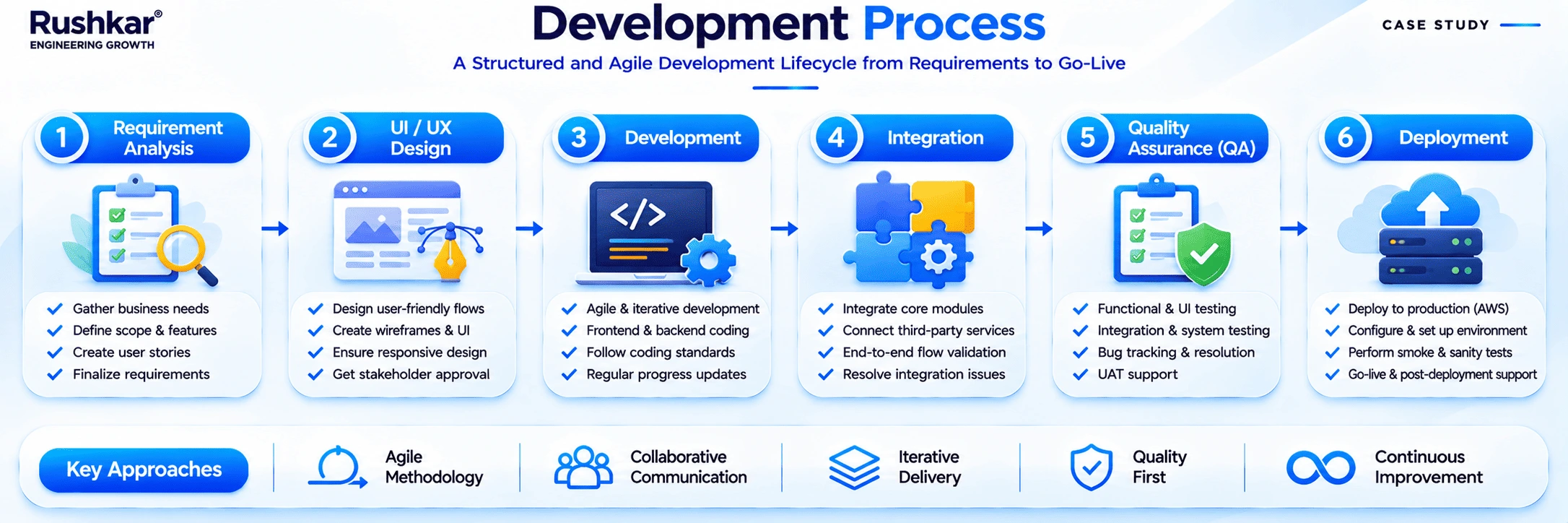
Rushkar followed a development process covering requirement analysis, UI/UX design, client review, application development, integration, validation, and deployment.
17.1 Requirement Analysis
The project began with understanding the business requirements and the responsibilities of each user group.
The team reviewed the customer booking process, provider operations, administrative functions, and the application requirements behind them. This helped define what each interface needed to support.
17.2 UI/UX Design and Wireframing
Wireframes and interface layouts were prepared for the Customer App, Service Provider App, and Admin Panel.
The design work covered screen structures, navigation, and the main user interactions. Each interface followed the tasks of its intended users.
17.3 Client Review and Scope Alignment
The proposed designs and functional requirements were reviewed with the client.
This stage helped align the interface work with the expected application functions before development continued.
17.4 Application Development
Development covered the Flutter customer and provider applications, the web Admin Panel, and the .NET backend.
Database work was also part of the implementation. The applications were connected to the shared backend so they could use the same application records and business logic.
17.5 Integration and Validation
The required third-party integrations were added to their respective application workflows.
Testing and validation covered authentication, service browsing, booking, payment, notifications, and administrative functions. The supplied project material does not provide detailed test coverage figures or test results, so none are stated here.
17.6 Deployment and Delivery
The application components were prepared for deployment within the AWS environment.
Deployment covered the backend, database, and media storage requirements described in the project scope.
18. Project Outcomes and Business Value
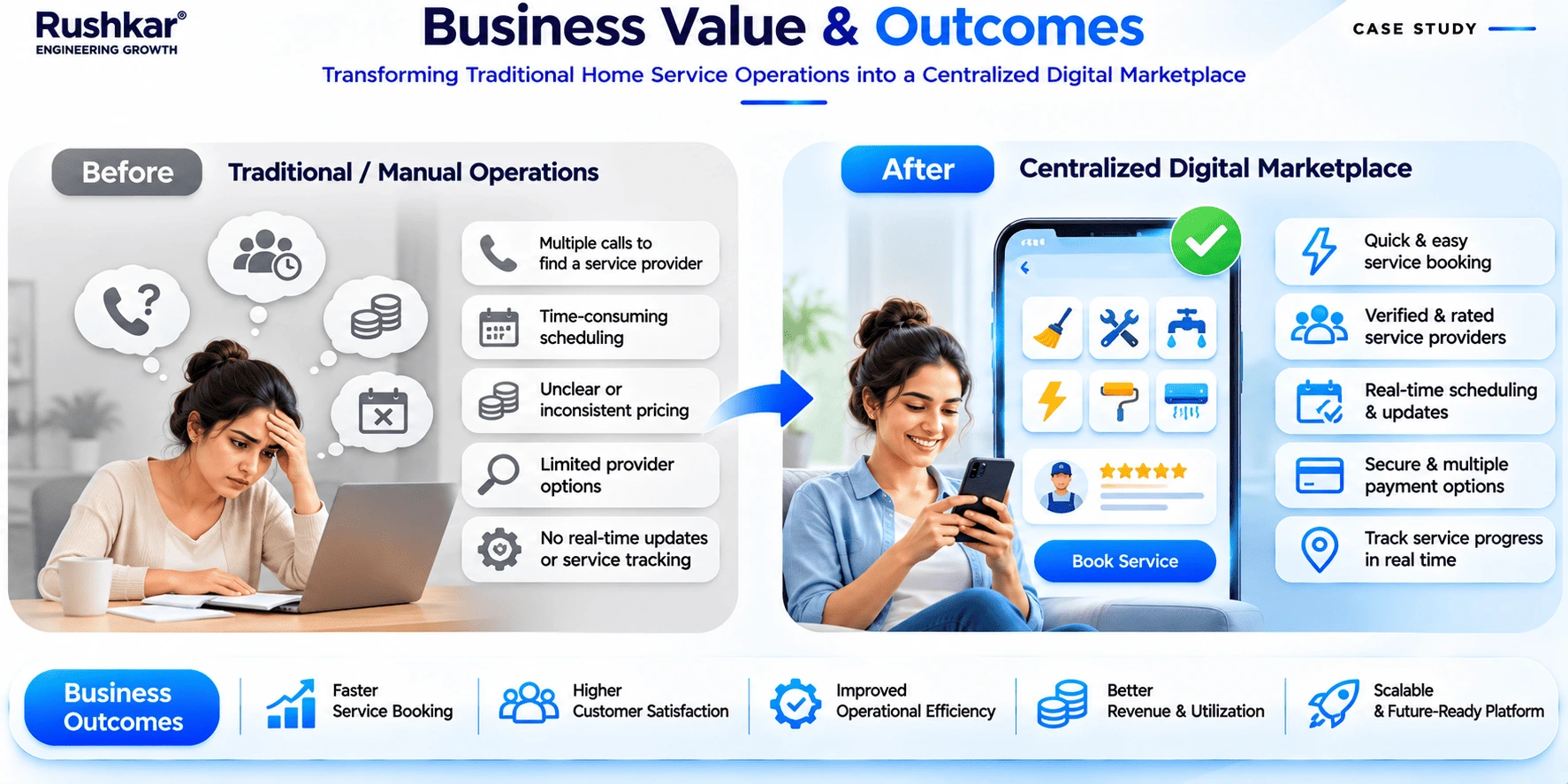
The project delivered a connected application system for managing customer bookings, provider work, and marketplace administration.
18.1 Customer Booking Access
Customers can browse service categories, review service details, select appointment slots, confirm bookings, and make online payments through the mobile application.
They can also return to booking history and access available appointment information.
18.2 Centralized Administration
The Admin Panel gives authorized staff access to customer and provider records, service categories, catalogue entries, pricing, availability, bookings, and provider assignments.
These functions are maintained through one administrative interface rather than being spread across the customer and provider applications.
18.3 Provider Job Management
Service providers have a dedicated mobile application for viewing assigned jobs and reviewing the information connected with each booking.
The available status functions also allow providers to record service progress within the platform.
18.4 Booking and Payment Handling
The customer booking flow includes appointment selection, booking confirmation, and online payment through Razorpay.
The platform also maintains payment and transaction information for administrative visibility.
18.5 Connected Application Records
The three interfaces use the same backend and application database.
This connects customer booking information with provider and administrative operations. Each role accesses the records and functions relevant to its responsibilities.
18.6 Scope for Further Development
The delivered platform provides the core application functions described in this case study. Additional reporting, automation, and AI-based capabilities could be assessed separately as business requirements and data availability develop.
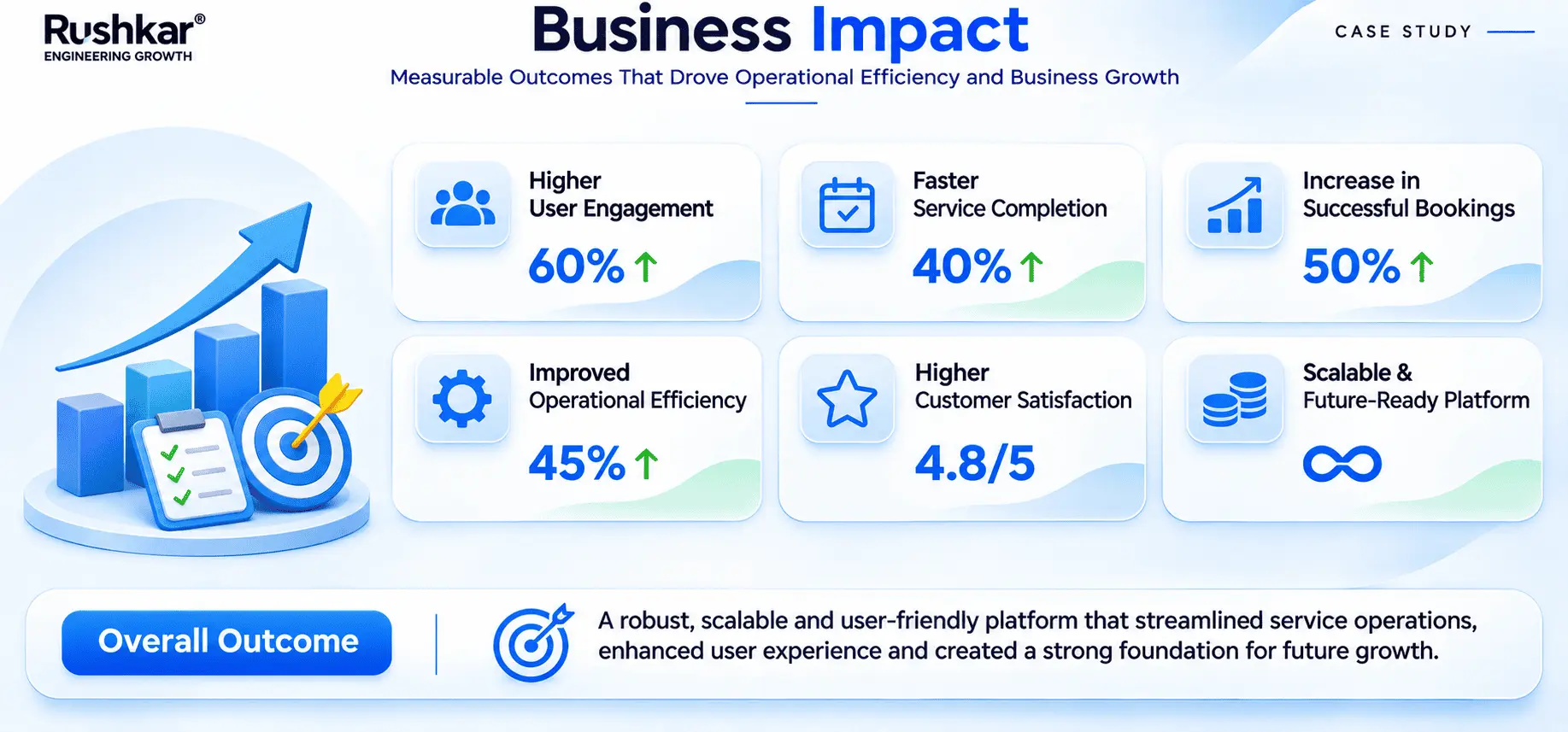
No numerical business performance or efficiency improvements are stated because verified production metrics were not provided. The outcomes described here are the capabilities delivered within the documented project scope.
19. Project Team and Delivery
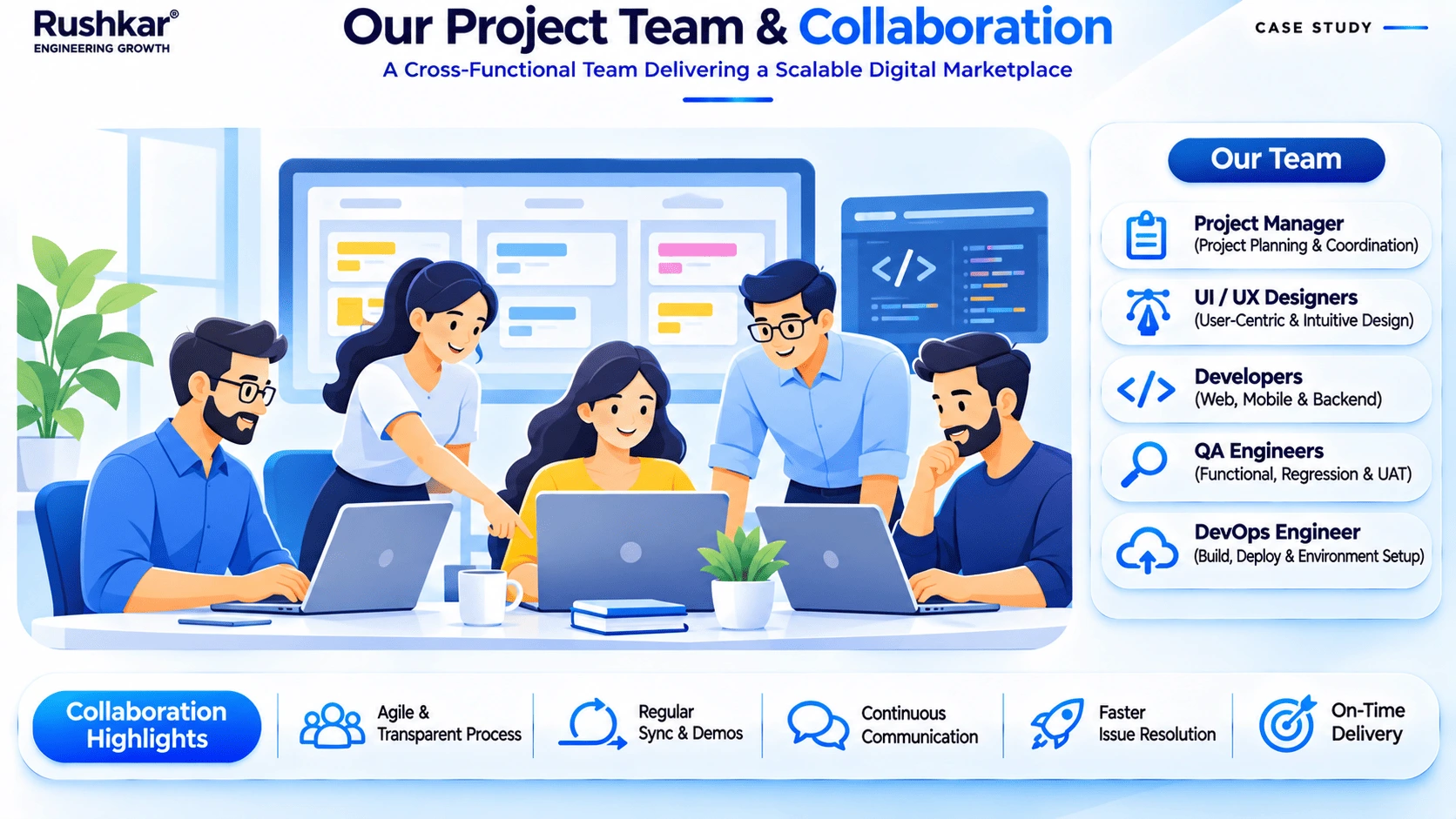
The project required coordination across mobile development, backend engineering, web development, database work, design, testing, and deployment.
The team responsibilities included:
| Project Role |
Area of Work |
| Project Management |
Project coordination and delivery tracking |
| Business Analysis |
Requirement gathering and functional analysis |
| UI/UX Design |
User flows, wireframes, and interface layouts |
| Flutter Development |
Customer and provider mobile applications |
| .NET Backend Development |
APIs, business logic, and integrations |
| Web Development |
Admin Panel |
| Database Development |
SQL Server database structure and data management |
| Quality Assurance |
Functional testing and issue validation |
| Deployment Coordination |
AWS environment and deployment support |
Each role covered a different part of the application. The work also required coordination between those areas because customer bookings, provider job information, and administrative records are connected.
The team worked across requirement analysis, design, development, integration, validation, and deployment to deliver the platform according to the defined project scope.
20. AI-Ready Architecture and Future Scope
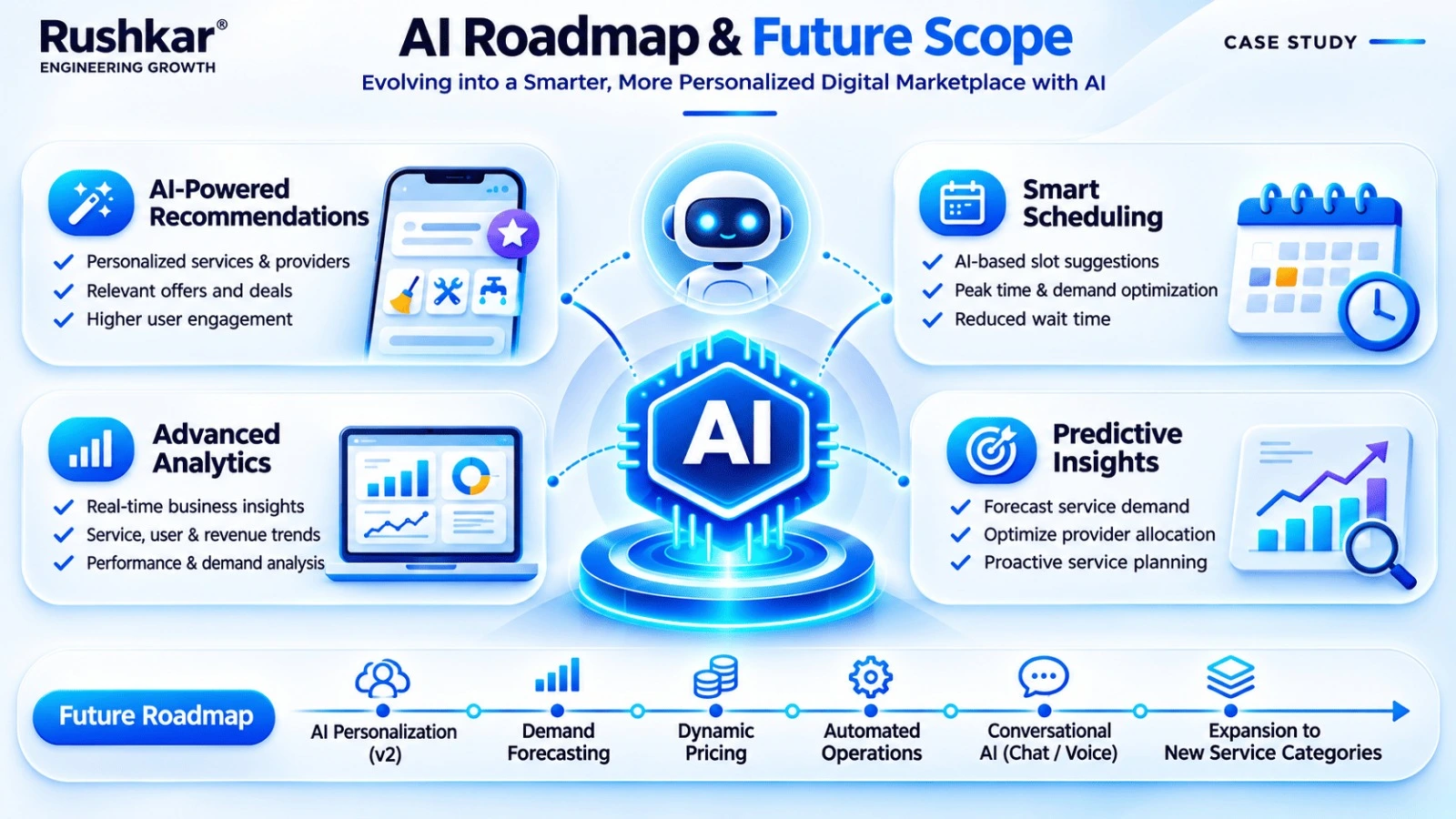
The current platform does not contain AI functionality. Its application logic handles the delivered booking, provider, payment, and administrative workflows.
Some of the data maintained by the platform could be assessed for later AI development. That would require more than connecting a model to the database. The business would first need to define the intended use case, review the quality and coverage of the available records, and decide how the output would be used in actual operations.
| Potential Future Enhancement |
Possible Business Use |
| AI-based service recommendations |
Suggest relevant services using suitable customer activity and booking history |
| Demand forecasting |
Study historical booking patterns across services and operational areas |
| Provider matching assistance |
Help assess providers using service requirements, location, and availability |
| Scheduling suggestions |
Support appointment planning using availability and booking information |
| AI-assisted customer support |
Answer common questions using approved support information |
| Business intelligence and analytics |
Review booking, service, and provider activity |
| Operational insights |
Identify patterns that may need administrative attention |
These enhancements represent possible development work for separate phases. Their suitability would depend on the business requirements, available data, integration needs, and expected operating costs.
21. UI/UX Design Showcase
The project contains three application interfaces, each built around a different set of user tasks. The design showcase should use actual screens from the delivered applications to show how those tasks are presented.
The Customer App section should include service categories, service details, appointment selection, booking confirmation, and payment screens.
The Provider App section should show provider login, assigned bookings, job details, and the available service status functions.
The Admin Panel section should include the dashboard, service catalogue, provider records, booking management, and pricing configuration.
22. Conclusion
Rushkar developed an on-demand home services marketplace with separate applications for customers, service providers, and administrators. The Customer App handles service discovery and booking. The Provider App gives service providers access to assigned work and service progress functions. The Admin Panel supports the management of customers, providers, services, pricing, availability, bookings, and related records.
A shared .NET backend connects the applications, while Microsoft SQL Server maintains the platform's main data. AWS provides the hosting and media storage environment. Razorpay, Twilio, Firebase Cloud Messaging, and Google Maps support the payment, verification, notification, and mapping functions included in the project.
The delivered scope covers the marketplace's main booking and administrative requirements. AI-based recommendations, automated provider matching, predictive scheduling, and other intelligent functions remain possible additions, not completed features.
For a similar platform, the important work starts with understanding how the service operation runs: how customers book, how availability is managed, how providers receive jobs, and what administrators need to control. Those decisions shape the application structure and the backend behind it.
